What is Generac Mobile Link, and how does it work?
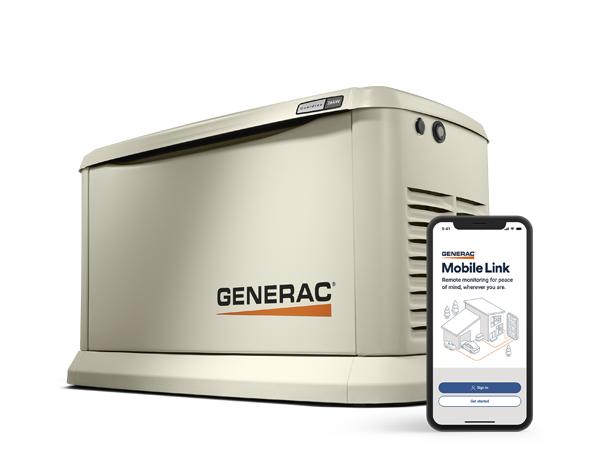
Generac Mobile Link is a remote monitoring system designed for standby generators. It allows homeowners and business owners to check their generator status from a phone, tablet, or computer. Instead of walking outside to inspect the unit, you can see everything in real time through an app.
The system works by connecting your generator to the internet using Wi-Fi or a cellular signal. Once connected, it sends updates to Generac’s cloud platform. From there, the information is displayed inside the Mobile Link app.
This setup gives you instant visibility into your generator’s condition. You can see if it is running, idle, or experiencing a problem. You also receive alerts when something needs attention. In short, it turns your generator into a smart, connected system.
Why Lakeland homeowners are choosing remote generator monitoring
In Lakeland, power outages are not rare. Storms, heavy rain, and high winds can disrupt power at any time. Because of this, many homeowners are investing in standby generators. However, simply having a generator is not always enough.
People want to know that their system will work when it matters most. That is where Mobile Link becomes valuable.
Remote monitoring adds a layer of confidence. Even if you are not at home, you can check your generator instantly. For example:
-
You can confirm the generator started during a storm
-
You can see if there is a fault or a warning
-
You can track performance while traveling
This is especially helpful for seasonal residents or rental property owners in Lakeland. It ensures the home stays protected, even when no one is physically present.
Overview of benefits for residential and commercial users
Generac Mobile Link offers clear advantages for both homeowners and business owners. While the system is simple to use, its impact is significant.
Here are the main benefits:
-
24/7 visibility: You always know your generator’s status
-
Instant alerts: Get notified about outages or issues right away
-
Preventative maintenance: Stay ahead of service needs
-
Reduced repair costs: Catch problems early before they grow
-
Peace of mind: Feel confident during storms or outages
For businesses, these benefits are even more critical. Power loss can affect operations, equipment, and revenue. With Mobile Link, business owners can respond quickly and avoid downtime.
Overall, the system adds reliability and control. It helps ensure your generator is ready when you need it most.
How Generac Mobile Link Works (Simple Explanation)
Connection between the generator, Wi-Fi, and the mobile app
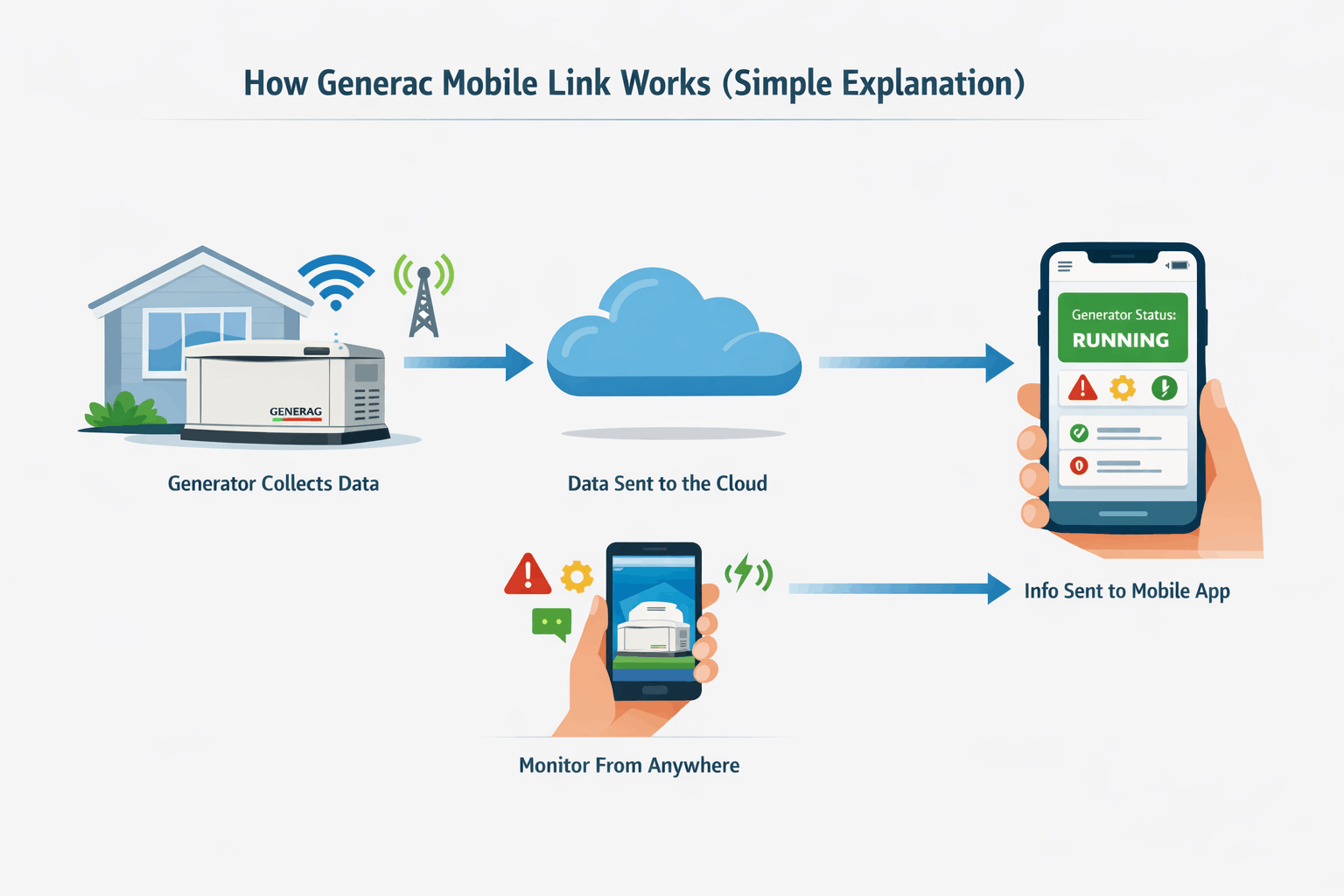
The Mobile Link system relies on a simple connection process. Your generator is equipped with a monitoring device. This device connects to your home’s Wi-Fi network or uses a cellular signal.
Once connected, the generator sends data to Generac’s secure servers. The Mobile Link app then pulls that data and displays it in an easy-to-read format.
The process works like this:
-
The generator collects system data
-
Data is sent through Wi-Fi or cellular connection
-
Information is stored in the cloud
-
You access it through the Mobile Link app
Because of this setup, you can check your generator from anywhere. As long as your phone has internet access, you stay connected.
Real-time alerts and notifications explained
One of the most useful features of Mobile Link is its alert system. Instead of checking your generator manually, the system keeps you informed automatically.
You can receive alerts for:
-
Power outages
-
Generator start and stop events
-
Maintenance reminders
-
Error codes or system faults
These alerts can be sent through push notifications, emails, or text messages. You can also customise how and when you receive them.
This feature is especially helpful during severe weather in Lakeland. If a storm causes an outage, you will know right away if your generator is running properly.
Monitoring your generator from anywhere
With Mobile Link, distance is no longer a concern. Whether you are at work, on vacation, or managing multiple properties, you can monitor your generator at any time.
This flexibility is one of the biggest reasons people choose the system. For example:
-
Homeowners can check their system while travelling
-
Landlords can monitor rental properties remotely
-
Business owners can oversee backup power systems off-site
The app gives you a clear dashboard that shows system status, history, and alerts. You do not need technical knowledge to understand it.
As a result, generator monitoring becomes simple and accessible. You stay informed without needing to be physically present.
Key Features of Generac Mobile Link System
Live generator status updates
One of the most useful features of Generac Mobile Link is the ability to see your generator’s status in real time. Instead of guessing whether your system is working, you get clear and instant updates.
The app shows whether your generator is:
-
Running during a power outage
-
Idle and ready on standby
-
Experiencing a warning or fault
This level of visibility is important in Lakeland, where outages can happen quickly during storms. You can check your system within seconds and confirm everything is operating as expected.
Maintenance tracking and service reminders
Generators require regular maintenance to stay reliable. Mobile Link helps you stay on schedule without needing to remember every service date.
The system tracks usage and run time. Based on that data, it sends reminders for:
-
Oil changes
-
Filter replacements
-
General inspections
These reminders reduce the risk of missed maintenance. As a result, your generator stays in better condition and lasts longer.
For homeowners, this means fewer surprises. For businesses, it helps avoid costly downtime.
Performance history and runtime tracking
Mobile Link does more than show the current status. It also records your generator’s performance over time. This includes detailed runtime history and past activity.
You can review:
-
How often the generator has run
-
Duration of each run cycle
-
Previous alerts or faults
This information is helpful when diagnosing issues. If a problem occurs, technicians can use this data to identify patterns and fix the issue faster. It also helps you understand how your generator performs during different conditions, especially during heavy storm seasons in Florida.
Custom alerts via text, email, or app
Every property has different needs. Mobile Link allows you to customize alerts so they match your preferences.
You can choose how you receive notifications:
-
Push alerts through the app
-
Email updates
-
Text messages for urgent issues
You can also decide which alerts matter most. For example, some users only want outage alerts, while others prefer full system updates. This flexibility ensures you stay informed without feeling overwhelmed by unnecessary notifications.
Dealer integration for automatic service support
Another key feature is dealer integration. Mobile Link can connect your generator directly to a local service provider.
When enabled, your electrician or service company can:
-
Monitor your generator remotely
-
Receive alerts about issues
-
Respond quickly when service is needed
This is especially useful in Lakeland, where fast response times matter during storms. Instead of waiting to notice a problem, your service provider may already be aware of it. This feature adds an extra layer of protection and convenience.
Generac Mobile Link Setup Process (Step-by-Step Guide)
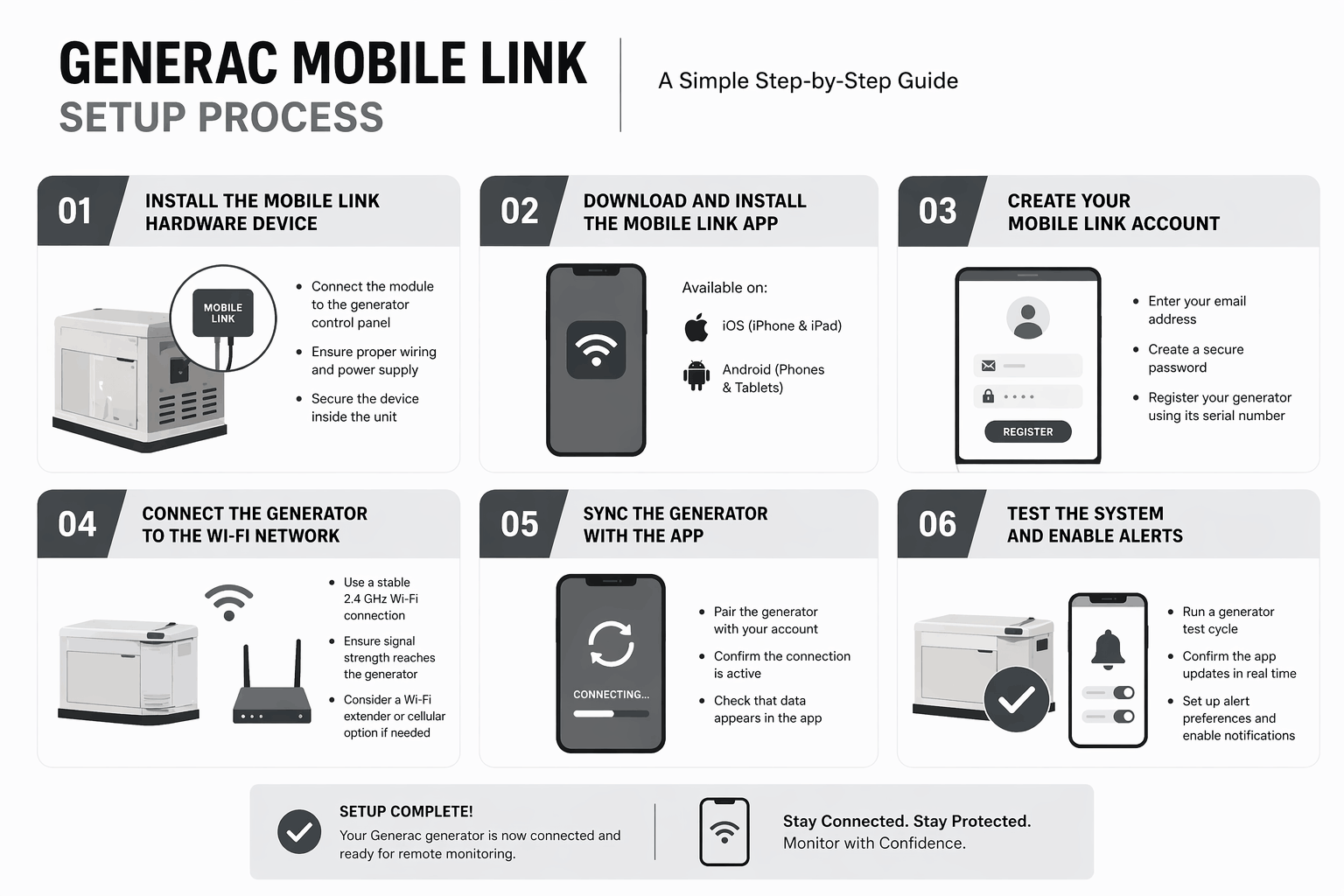
Step 1: Install the Mobile Link hardware device
The first step is installing the Mobile Link hardware inside your generator. This device allows the system to communicate with the app.
Installation usually involves:
-
Connecting the module to the generator control panel
-
Ensuring proper wiring and power supply
-
Securing the device inside the unit
Because this step involves electrical components, it should be handled by a licensed electrician. Proper installation ensures safe operation and prevents future issues.
Step 2: Download and install the Mobile Link app
Once the hardware is installed, the next step is downloading the Mobile Link app.
The app is available on:
-
iOS devices (iPhone and iPad)
-
Android smartphones and tablets
After downloading, you will have access to the main dashboard, where all generator data will appear.
The interface is simple and easy to understand, even for first-time users.
Step 3: Create your Mobile Link account
After installing the app, you will need to create an account. This step connects your generator to your personal profile.
You will be asked to:
-
Enter your email address
-
Create a secure password
-
Register your generator using its serial number
The serial number is usually located on the generator unit. Once entered, the system links your device to your account.
Step 4: Connect the generator to the Wi-Fi network
Next, you will connect your generator to your home’s Wi-Fi network. This allows the system to send data to the app.
Important points to consider:
-
Use a stable 2.4 GHz Wi-Fi connection
-
Ensure signal strength reaches the generator location
-
Avoid weak or unstable networks
If the signal is weak, you may need a Wi-Fi extender. In some cases, a cellular option may be a better choice, especially in areas with limited internet coverage.
Step 5: Sync the generator with the app
Once connected to Wi-Fi, the generator must be synced with the Mobile Link app.
This step includes:
-
Pairing the generator with your account
-
Confirming the connection is active
-
Checking that data appears in the app
The process usually takes a few minutes. After syncing, you should see your generator status on the dashboard.
Step 6: Test the system and enable alerts
The final step is testing the system to ensure everything works correctly.
This includes:
-
Running a generator test cycle
-
Confirming the app updates in real time
-
Setting up alert preferences
Make sure notifications are enabled so you receive updates when needed. Once this step is complete, your Mobile Link system is fully operational.
Professional Installation vs DIY Setup
Why hardware installation should be done by a licensed electrician
Installing the Mobile Link device involves working inside the generator’s control panel. This is not a simple plug-and-play task. It requires proper wiring, safe handling of electrical components, and knowledge of generator systems.
A licensed electrician ensures:
-
Correct and secure wiring
-
Compliance with electrical codes
-
Protection of your generator warranty
-
Safe operation under all conditions
In Lakeland, where generators are often used during severe weather, proper installation matters even more. A small mistake can lead to system failure when you need it most.
What parts homeowners can set up themselves
While the hardware installation should be handled by a professional, the rest of the setup is simple and user-friendly.
Homeowners can easily manage:
-
Downloading the Mobile Link app
-
Creating an account
-
Connecting to Wi-Fi
-
Setting up alerts and preferences
These steps are designed to be straightforward. Most users can complete them in a short time without technical help. This balance between professional installation and simple user setup makes the system both safe and convenient.
Typical installation timeline in Lakeland
In most cases, Mobile Link installation is quick. A trained electrician can complete the process efficiently.
Typical timeline:
-
Hardware installation: 30–60 minutes
-
App setup and syncing: 15–30 minutes
-
Testing and final checks: 10–15 minutes
Many installations in Lakeland are completed in a single visit. This means you can go from no monitoring to full remote access in just a few hours.
Mobile Link Connectivity Options
Wi-Fi monitoring setup (most common option)
Wi-Fi is the most common way to connect your generator to Mobile Link. It uses your home’s internet connection to send data to the app.
Benefits of Wi-Fi setup:
-
No monthly fees in most cases
-
Fast data updates
-
Easy integration with home networks
However, the generator must be within range of your router. If the signal is weak, the connection may become unreliable. For many Lakeland homes, especially those in suburban areas, Wi-Fi works well when properly configured.
Cellular monitoring option (backup connectivity)
Cellular monitoring is another option. Instead of relying on your home internet, it uses a built-in cellular signal to transmit data.
This option is ideal when:
-
Wi-Fi signals are weak or inconsistent
-
The generator is far from the house
-
Internet service is unreliable during storms
Cellular monitoring often comes with a small annual fee. However, it provides added reliability, especially during severe weather conditions common in Florida.
Choosing the best option for Lakeland homes
The right connectivity option depends on your property and needs. In Lakeland, weather plays a major role in this decision.
Here is a simple comparison:

If your home has stable internet and strong signal coverage, Wi-Fi is usually enough. However, if reliability during storms is a priority, cellular monitoring offers extra peace of mind.
Costs of Generac Mobile Link Setup and Monitoring
Equipment and installation costs
The total cost of Mobile Link setup depends on the type of generator and installation complexity.
Typical cost breakdown:
-
Mobile Link hardware module: moderate one-time cost
-
Professional installation: varies based on setup
-
Additional equipment (if needed): Wi-Fi extender or accessories
In most cases, the investment is reasonable compared to the value it provides. It enhances the performance and reliability of your generator system.
Free vs paid subscription plans
Generac offers both free and paid monitoring options.
Free plan includes:
-
Basic status updates
-
Limited alerts
-
Standard monitoring features
Paid plans may include:
-
Advanced alerts and diagnostics
-
Extended data history
-
Dealer monitoring integration
-
Priority support
Paid plans usually range from affordable yearly fees. Many homeowners choose to start with the free version and upgrade later if needed.
Long-term value and return on investment
While there is an upfront cost, Mobile Link can save money over time. It helps detect problems early and reduces the risk of major repairs.
Long-term benefits include:
-
Fewer emergency service calls
-
Extended generator lifespan
-
Better maintenance scheduling
-
Reduced downtime during outages
For Lakeland homeowners, where storms can cause frequent outages, this added reliability is worth the investment.
Common Mobile Link Setup Problems and Solutions
Weak Wi-Fi signal at the generator location
A weak Wi-Fi signal is one of the most common issues during setup. Since generators are often installed outside or away from the main living area, the signal may not reach properly.
Signs of a weak signal include:
-
Delayed updates in the app
-
Frequent disconnections
-
Failed setup attempts
Simple solutions:
-
Install a Wi-Fi extender near the generator
-
Use a mesh network for better coverage
-
Move the router closer if possible
If the signal still struggles, switching to a cellular connection may be the better option.
App not connecting to the generator
Sometimes the app does not sync with the generator right away. This can be frustrating, but the issue is usually easy to fix.
Common causes include:
-
Incorrect login or account setup
-
Generator not properly registered
-
Wi-Fi connection issues
Steps to resolve:
-
Double-check your account details
-
Re-enter the generator serial number
-
Restart the app and try syncing again
-
Power cycle the generator if needed
If the problem continues, a technician can quickly identify the issue.
Missing alerts or delayed notifications
If alerts are not coming through, the system may still be working, but notifications are not set correctly.
Check the following:
-
App notification settings are enabled
-
Phone permissions allow alerts
-
Email or SMS settings are correct
Also, ensure your internet connection is stable. Delays can happen if the signal is weak or interrupted.
When to call a professional in Lakeland
Some issues require expert help. If basic troubleshooting does not fix the problem, it is best to call a local electrician.
You should seek professional help if:
-
The generator is not connecting at all
-
You see repeated fault codes
-
The hardware appears damaged
-
The system goes offline frequently
In Lakeland, quick service is important, especially during storm season. A trained professional can restore your system and ensure it works reliably when needed.
Benefits of Generator Monitoring in Florida Weather
Hurricane and storm preparedness
Florida weather can change quickly. Storms and hurricanes often bring sudden power outages. With Mobile Link, you do not have to guess what is happening at home.
The system alerts you as soon as:
-
Power goes out
-
The generator starts running
-
Any issue affects performance
This immediate feedback helps you act quickly if something is wrong.
Remote monitoring during travel or evacuation
Many Lakeland residents travel or leave during severe storms. Without monitoring, it is difficult to know what is happening at your property.
Mobile Link solves this problem.
You can:
-
Check generator status from anywhere
-
Confirm your home has backup power
-
Stay informed even during evacuation
This is especially useful for vacation homes or rental properties.
Protecting home appliances and systems
Power outages can damage appliances, HVAC systems, and electronics. A properly working generator helps prevent this, but only if it runs correctly.
Mobile Link helps protect your home by:
-
Confirming the generator activates when needed
-
Alerting you to issues before damage occurs
-
Supporting timely maintenance
This added awareness reduces risk and protects your investment.
Integrating Mobile Link with Smart Home Systems
Compatibility with smart home ecosystems
Many homeowners today use smart home systems for convenience and control. Generac Mobile Link fits well into this setup. While it is primarily a standalone app, it can work alongside other smart systems to create a more connected home environment.
This allows you to monitor:
-
Power systems
-
Security devices
-
Climate control
All from your phone or tablet.
Centralised home monitoring benefits
When your generator is part of a larger smart home system, everything becomes easier to manage.
Key advantages include:
-
One place to check multiple systems
-
Faster response during emergencies
-
Better overall home awareness
Instead of managing separate systems, you get a more organized and efficient setup.
Future of smart generator technology
Generator technology continues to improve. Monitoring systems like Mobile Link are becoming more advanced with each update.
Future improvements may include:
-
More detailed diagnostics
-
Predictive maintenance alerts
-
Deeper smart home integration
These features will make generators even more reliable and easier to manage.
Choosing the Right Electrical Contractor in Lakeland
What to look for in a generator specialist
Choosing the right contractor is just as important as choosing the right equipment. A skilled electrician ensures your system is installed and configured correctly.
Look for:
-
Proper licensing and insurance
-
Experience with standby generators
-
Knowledge of Mobile Link systems
A qualified contractor will also explain the setup clearly and answer your questions.
Importance of local experience in Lakeland, Florida
Local experience matters. Electricians in Lakeland understand the area’s weather patterns, building codes, and common electrical challenges.
Benefits of hiring a local expert:
-
Faster response times
-
Familiarity with storm-related issues
-
Better long-term support
This local knowledge helps ensure your system performs well in real conditions.
Questions to ask before hiring
Before choosing a contractor, ask a few key questions:
-
Do you have experience with Generac Mobile Link setup?
-
Are you licensed and insured in Florida?
-
Do you offer maintenance or service plans?
-
How quickly can you respond during emergencies?
These questions help you find a reliable professional who can support your system long after installation.
Why Choose Hylton Electric for Mobile Link Setup
Expertise in Generac generator installation and monitoring
Hylton Electric brings hands-on experience with standby generators and Mobile Link systems. Proper setup is not just about connecting wires. It also involves configuring the system so it communicates correctly with the app.
With professional support, you get:
-
Accurate installation of Mobile Link hardware
-
Proper Wi-Fi or cellular configuration
-
Full system testing before completion
This reduces the chance of setup errors and ensures everything works from day one.
Fast and reliable service in Lakeland
In Lakeland, timing matters. Power issues often happen during storms, and delays can lead to bigger problems. A local team can respond quickly when you need help.
Hylton Electric offers:
-
Prompt installation scheduling
-
Quick troubleshooting support
-
Reliable service during peak storm seasons
This level of responsiveness helps homeowners feel more prepared and supported.
Ongoing maintenance and monitoring support
Setup is only the first step. Generators need regular care to stay reliable. Hylton Electric provides ongoing support to keep your system in top condition.
Services may include:
-
Routine generator inspections
-
Maintenance scheduling
-
Monitoring assistance and troubleshooting
With continued support, your Mobile Link system remains accurate and dependable over time.
Maintenance Tips for Generac Mobile Link Users
Regular system checks using the app
Even though Mobile Link provides automatic updates, it is still a good idea to check your system regularly.
Simple habits include:
-
Opening the app once a week
-
Reviewing system status
-
Checking for any alerts or warnings
These quick checks help you catch small issues early.
Scheduling professional inspections
Routine inspections are essential for long-term performance. A professional can identify issues that may not appear in the app.
Recommended schedule:
-
At least once per year
-
Before storm season begins
-
After extended generator use
Regular service keeps your generator ready for unexpected outages.
Keeping firmware and app updated
Technology updates improve performance and fix bugs. Keeping your Mobile Link system updated ensures smooth operation.
Make sure to:
-
Update the Mobile Link app when new versions are available
-
Allow firmware updates for the generator system
-
Restart the system if updates require it
These small steps help avoid connection or performance issues.
Leave a Reply