
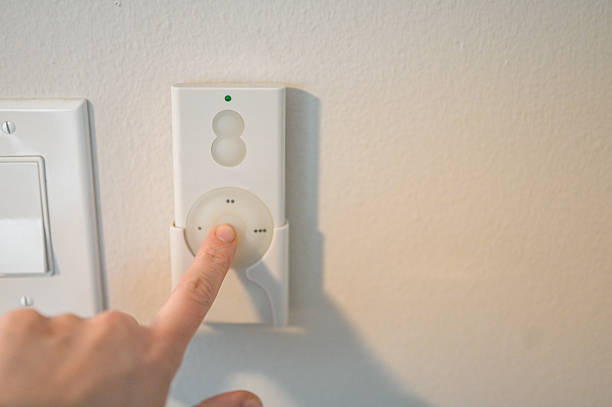
Lighting plays a bigger role in your home than most people realize. It affects how your space looks, feels, and even how much energy you use each month. In many Lakeland homes, lighting is still controlled by basic switches that offer little flexibility.
That is starting to change. Smart dimmer switches give you better control without a major upgrade. You can adjust brightness, set schedules, and manage your lights from your phone or with simple voice commands.
This guide explains everything in a clear and practical way. You will learn how smart dimmer switches work, what to look for, how installation works, and when it makes sense to hire a professional. Whether you want a small upgrade or a full smart lighting setup, this will help you make the right choice.
Why Smart Dimmer Switches Are Becoming Popular in Lakeland Homes
What Is a Smart Dimmer Switch (Simple Explanation)
A smart dimmer switch is a modern version of a regular light switch. It lets you turn lights on and off, but it also allows you to adjust brightness with precision. Instead of a simple flip, you can control lighting levels to match your needs.
What makes it “smart” is its ability to connect to your home network. You can control it through a mobile app, a voice assistant, or even set it on a schedule. For example, your lights can dim automatically in the evening or turn off when you leave the house.
Unlike traditional dimmers, these switches offer more than manual control. They give you flexibility. You can manage lighting from anywhere, whether you are at home or away. In simple terms, a smart dimmer switch combines convenience, control, and energy efficiency into one system.
Why Florida Homeowners Are Upgrading Their Lighting
Homeowners in Lakeland and across Florida are paying closer attention to how their homes use energy. Lighting plays a bigger role than many expect. Even small changes, like installing dimmers, can make a noticeable difference.
The warm climate also affects how people use lighting. Homes often rely on indoor comfort during long, hot days. As a result, lighting needs to be adaptable. Bright light for daytime tasks, softer light for evenings.
Another reason is the rise of smart homes. Many homeowners are adding devices that work together—thermostats, security systems, and lighting. Smart dimmer switches fit naturally into this setup.
Property value is also a factor. Buyers now look for modern features. Smart lighting can make a home feel updated without major renovations. In short, people are upgrading because it makes daily life easier, more efficient, and more comfortable.
Key Benefits of Smart Dimmer Switches
Smart dimmer switches offer practical benefits that go beyond simple lighting control.
- Better control of lighting: You can adjust brightness to match different activities. For example, brighter light for cooking and softer light for relaxing.
- Energy savings: Lower brightness uses less electricity. Over time, this can reduce your energy bills.
- Longer bulb life: Dimming reduces strain on bulbs. This helps them last longer and lowers replacement costs.
- Remote access: You can control lights through your phone. If you forget to turn them off, you can fix it from anywhere.
- Voice control: Many systems work with voice assistants. You can adjust lighting without touching a switch.
- Improved home security: Scheduled lighting makes your home look occupied, even when you are away.
- Custom lighting scenes: You can set moods for different times of day. For example, a calm evening setting or a bright morning routine.
These benefits make smart dimmers a practical upgrade for both comfort and efficiency.
How Smart Dimmer Switches Work (Explained Simply)
Basic Working Principle
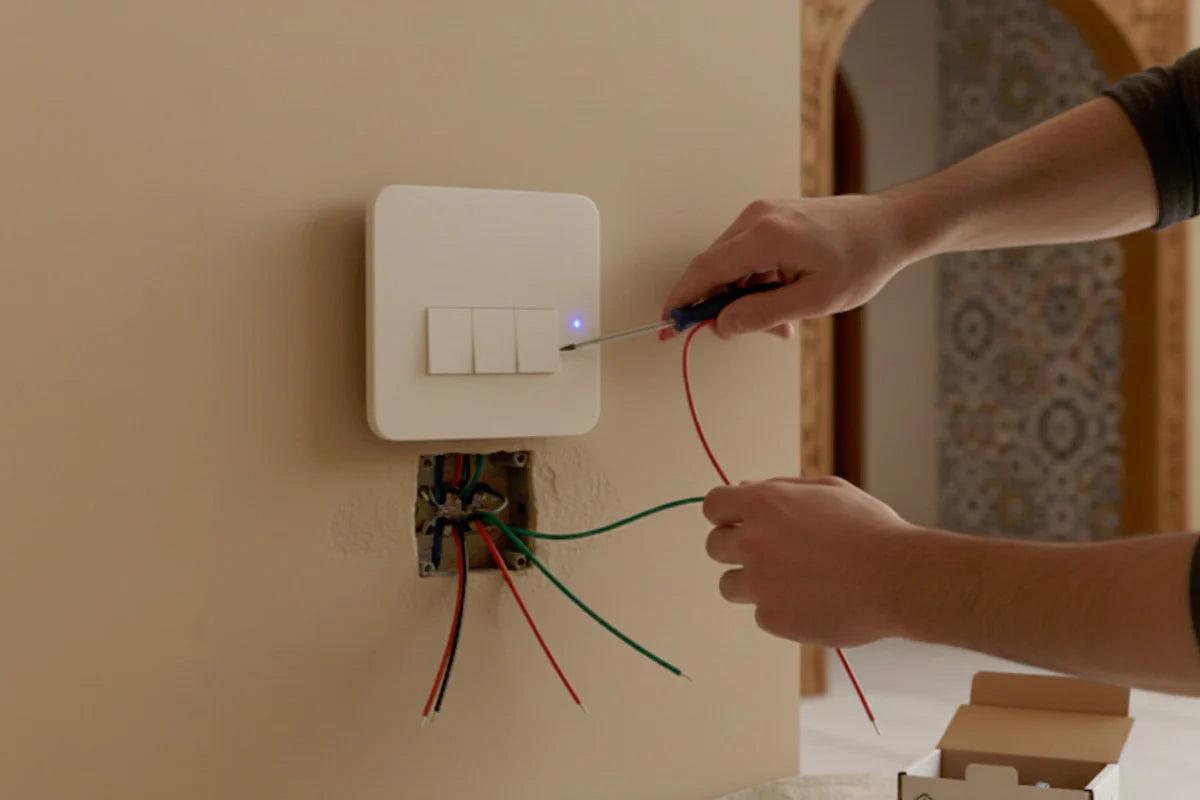
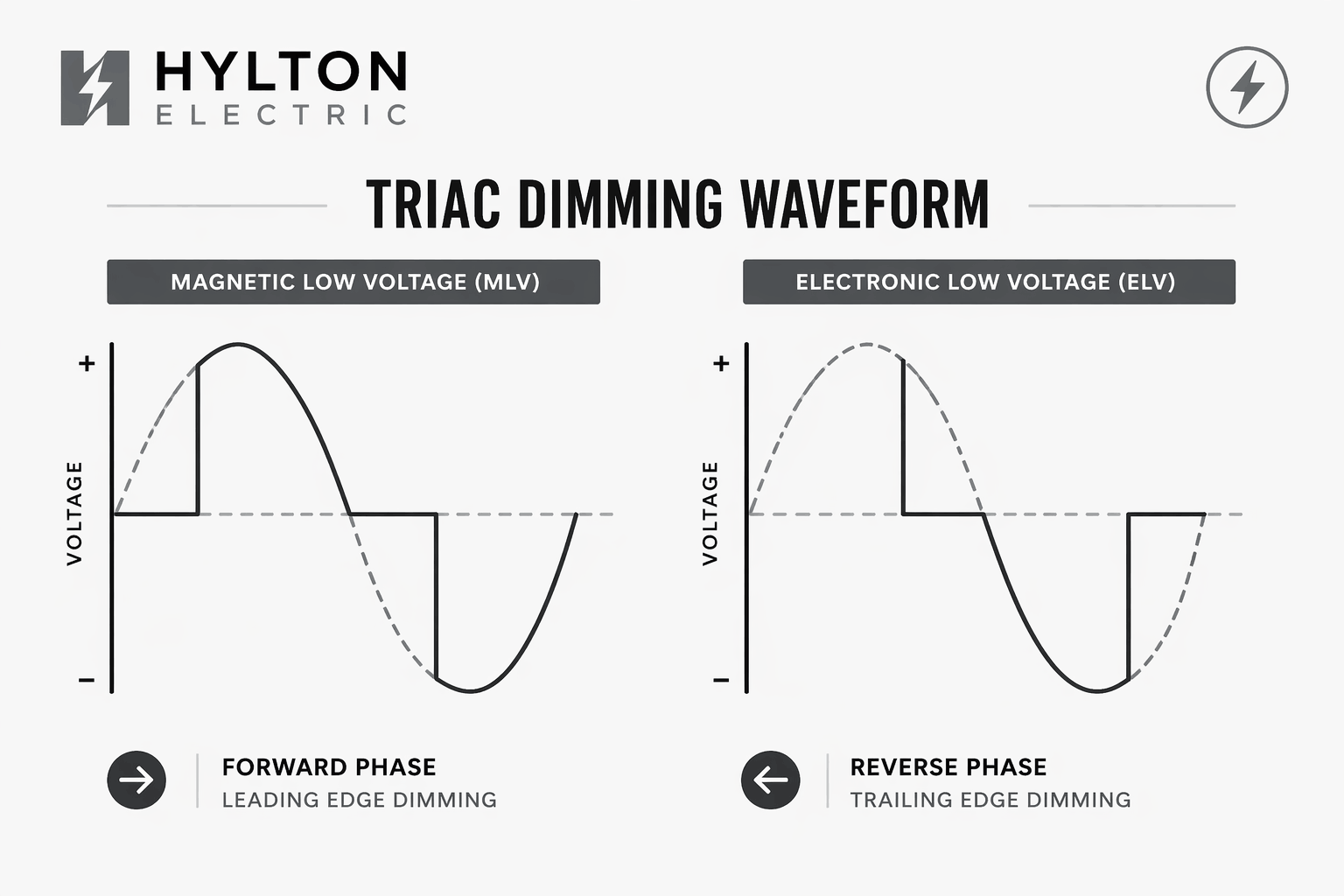
At its core, a dimmer switch controls how much electricity flows to a light. Instead of sending full power all the time, it adjusts the flow. This changes how bright the light appears.
A standard switch has only two states—on or off. A dimmer adds a range between those two points. You can fine-tune the brightness to suit your space.
Smart dimmers take this one step further. They combine this electrical control with digital features. That means you can adjust brightness through an app or automation, not just by hand.
Connectivity Options
Smart dimmer switches rely on different types of connections to work properly.
- Wi-Fi dimmers: These connect directly to your home internet. They are easy to set up and work well for most homes.
- Zigbee or Z-Wave dimmers: These use a hub to communicate. They are often more stable in larger smart home systems.
- Bluetooth dimmers: These connect directly to your phone. However, they usually have a limited range compared to Wi-Fi options.
Each option has its place. For most homeowners in Lakeland, Wi-Fi dimmers are the simplest and most practical choice.
Integration with Smart Home Systems
One of the strongest features of smart dimmer switches is how well they work with other smart devices. You can connect them to systems like voice assistants or home automation apps. This allows you to control lighting with simple commands.
For example:
-
Turn the lights on when you arrive home
-
Dim lights automatically at night
-
Sync lighting with other devices like thermostats or security systems
You can also create routines. A “morning” routine might slowly increase brightness. An “evening” routine might dim lights to help you relax. This level of control turns lighting into part of a complete home system, rather than a standalone feature.
Types of Smart Dimmer Switches for Different Homes
Single-Pole vs 3-Way vs 4-Way Switches
Not all light switches work the same way. Before choosing a smart dimmer, it helps to understand how your current setup works.:
- Single-pole switches: These control a light from one location. For example, a bedroom or bathroom with one switch near the door. This is the most common and easiest to upgrade.
- 3-way switches: These control one light from two different locations. You often see them in hallways, staircases, or large rooms. For example, one switch at each end of a hallway.
- 4-way switches: These are used when three or more switches control the same light. Larger homes may have this setup in open spaces or long corridors.
Choosing the right type matters. A smart dimmer must match your wiring setup. Otherwise, it will not work correctly.
In-Wall vs Plug-In Smart Dimmers
Smart dimmers come in two main styles. Each serves a different purpose.
- In-wall smart dimmers: These replace your existing wall switch. They offer a clean, built-in look and control the entire light circuit. This is the best option for permanent upgrades.
- Plug-in smart dimmers: These plug into an outlet and control lamps or small lighting fixtures. They are easy to install and do not require wiring changes.
For most homeowners, in-wall dimmers provide better long-term value. However, plug-in options work well for quick and flexible setups.
Neutral Wire vs No Neutral Wire Options
One of the most important things to check is whether your home has a neutral wire.
- Neutral wire dimmers: These require a neutral wire to function. Most newer homes have this wiring. It provides a stable connection for smart features.
- No neutral wire dimmers: These are designed for older homes. They work without a neutral wire but may have some limitations.
In many Lakeland homes, especially older ones, this can be a deciding factor. If you are unsure, it is best to have an electrician check your wiring.
LED-Compatible Dimmer Switches
Not all dimmers work well with LED lights. This is a common issue many homeowners face.
LED bulbs use less energy, but they require compatible dimmers. If the switch and bulb do not match, you may notice flickering, buzzing, or a limited dimming range.
What to look for:
-
Dimmable LED bulbs
-
Smart dimmer labeled for LED use
-
Compatible wattage range
Choosing the right combination ensures smooth performance and avoids frustration later.
Is Your Lakeland Home Ready for a Smart Dimmer Switch?
Electrical Requirements You Need to Check
Before installing a smart dimmer switch, it is important to check a few basic electrical details.
- Wiring type: Identify the wires in your switch box. These usually include line, load, neutral, and ground.
- Voltage compatibility: Most homes use standard voltage, but it is still important to confirm compatibility with the dimmer.
- Load capacity: Each dimmer supports a certain wattage. Adding too many lights can overload the switch.
Taking a few minutes to check these details can prevent problems during installation.
Common Challenges in Older Florida Homes
Older homes often come with a few extra challenges.
- No neutral wire: Many older properties do not have neutral wiring in switch boxes. This limits your choice of smart dimmers.
- Small electrical boxes: Some boxes may not have enough space for modern switches, which are slightly larger.
- Outdated panels or wiring: Older systems may need upgrades to handle new technology safely.
These issues are common, but they can usually be resolved with proper planning.
When You Need a Licensed Electrician
While some installations are simple, others require professional help.
You should consider hiring an electrician if:
-
You are unsure about wiring
-
Your home has no neutral wire
-
You are dealing with 3-way or 4-way switches
-
Your electrical panel needs updates
A licensed electrician ensures everything is installed safely and meets local codes. This reduces the risk of electrical issues later.
Step-by-Step Smart Dimmer Switch Installation Guide
Tools You’ll Need
Before you begin, gather all tools in one place. This keeps the process smooth and avoids interruptions.
Basic tools:
-
Flathead and Phillips screwdrivers
-
Voltage tester (non-contact is best)
-
Wire strippers
-
Needle-nose pliers
-
Wire connectors (wire nuts)
Having the right tools makes the job safer and faster.
Step 1 – Turn Off Power Safely
Go to your electrical panel and turn off the breaker that controls the switch. Do not rely on the switch itself. After that, use a voltage tester to confirm there is no power. This step is critical. Even a small mistake can lead to injury.
Step 2 – Remove the Old Switch
Remove the wall plate and unscrew the switch from the box. Gently pull it out so you can see the wires. Take a moment to observe how everything is connected. If needed, take a photo. This helps during reinstallation.
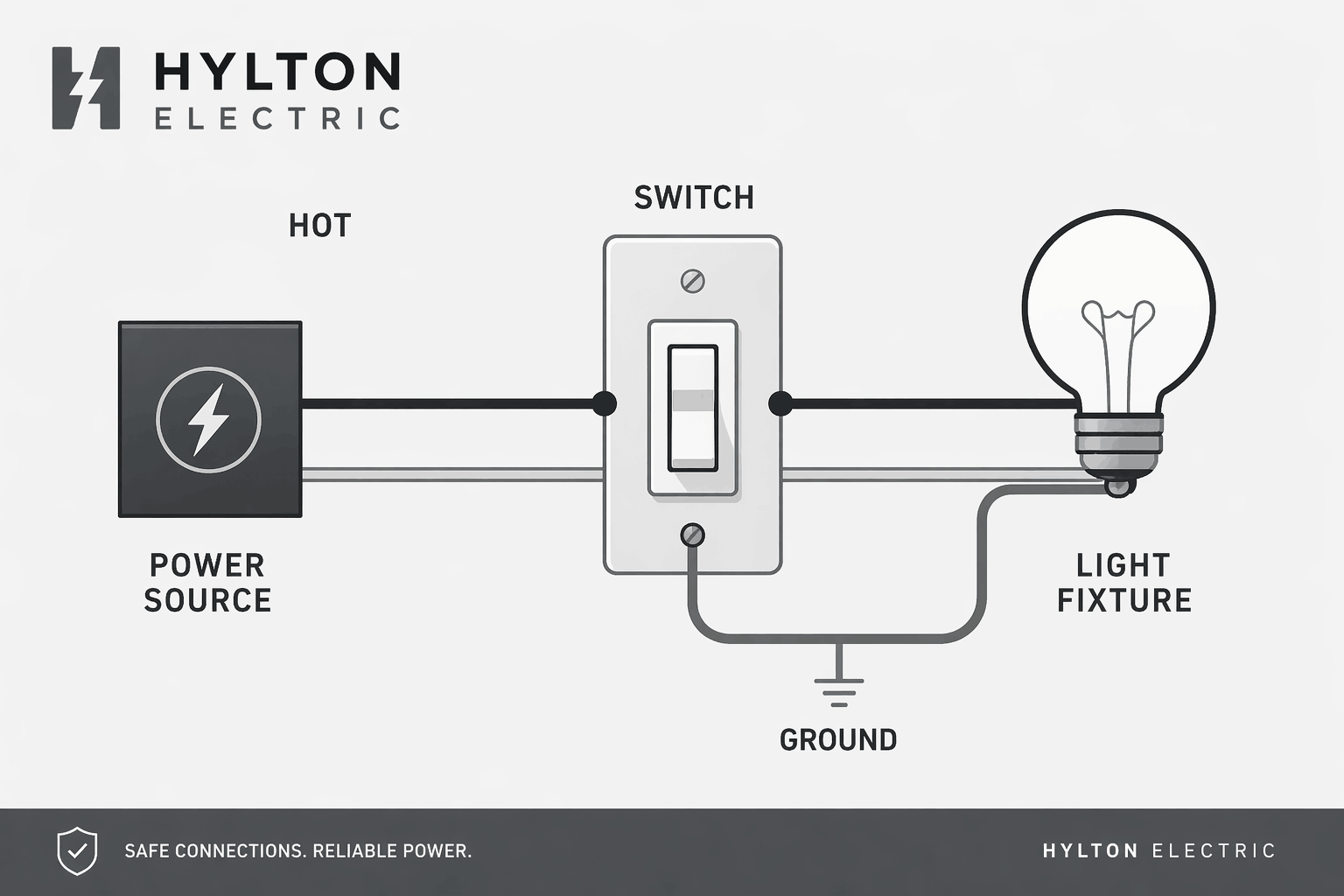
Step 3 – Identify Wiring (Line, Load, Neutral, Ground)
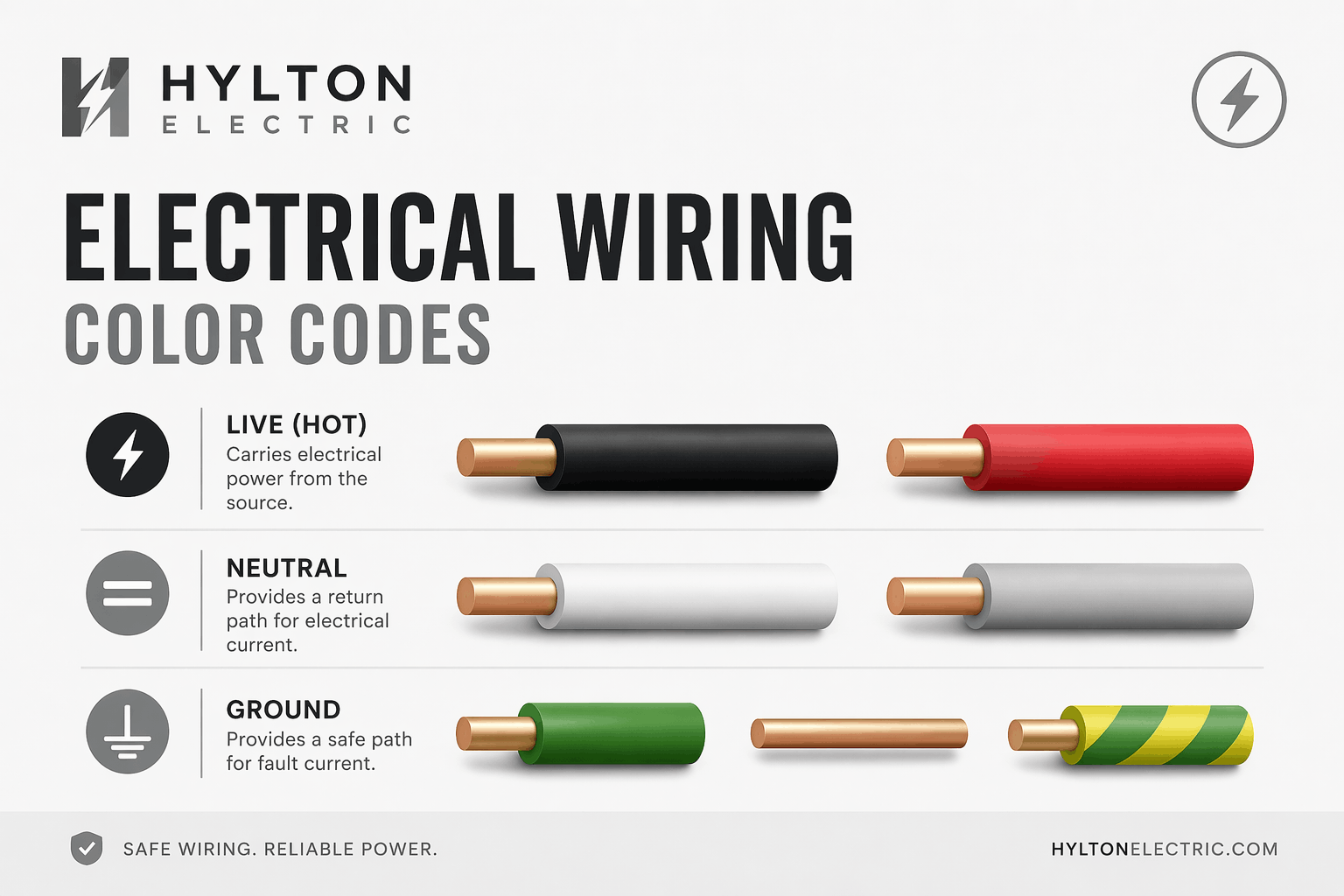
Each wire has a specific role:
-
Line (hot): brings power from the panel
-
Load: carries power to the light
-
Neutral: completes the circuit
-
Ground: provides safety
Correct identification is important. Mixing these wires can cause the switch to fail or create safety risks.
Step 4 – Connect the Smart Dimmer Switch
Follow the wiring diagram provided with your smart dimmer.
Match each wire:
-
Line to line
-
Load to load
-
Neutral to neutral
-
Ground to ground
Secure connections with wire connectors. Make sure nothing is loose. A firm connection prevents future issues.
Step 5 – Mount and Restore Power
Carefully place the wires back into the box. Screw the dimmer into place and attach the wall plate. Turn the breaker back on. Test the switch manually to confirm it works before moving to app setup.
Step 6 – Connect to Wi-Fi & App Setup
Download the app recommended by the switch manufacturer. Follow the setup steps to connect your dimmer to Wi-Fi.
Once connected, you can:
-
Control brightness from your phone
-
Set schedules
-
Create lighting scenes
This step completes the upgrade from a basic switch to a smart system.
DIY vs Professional Installation in Lakeland
When DIY Installation Works
Some installations are straightforward and can be handled without professional help.
DIY works best when:
-
You are replacing a single-pole switch
-
Wiring is clearly labeled
-
Your home has a neutral wire
-
You are comfortable using basic tools
In these cases, installation can take less than an hour.
When to Hire a Professional Electrician
Some situations require experience and technical knowledge.
You should hire a professional if:
-
You are installing a 3-way or 4-way switch
-
Wiring is unclear or outdated
-
There is no neutral wire
-
You need panel upgrades
Professional installation reduces the risk of wiring errors and ensures long-term reliability.
Cost of Professional Installation in Lakeland
The cost of installation can vary based on the complexity of the job.
Typical price range:
-
Basic installation: $100 – $200
-
Complex wiring: $200 – $300+
Factors that affect cost:
-
Type of switch (single vs multi-location)
-
Condition of existing wiring
-
Number of switches installed
While DIY may save money upfront, professional work often prevents costly issues later.
Smart Dimmer Switch Costs and ROI
Average Cost Breakdown
Here is a simple cost overview:
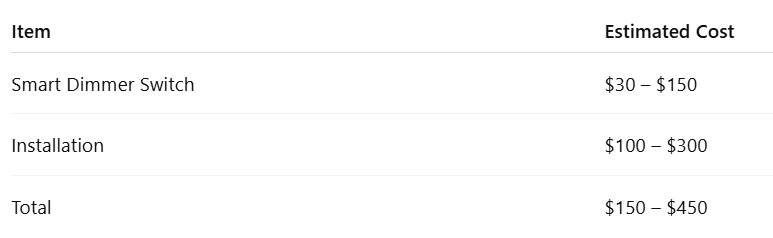
Prices vary depending on brand, features, and labor.
Long-Term Savings on Energy Bills
Smart dimmers help reduce energy use in a simple way. Lower brightness means less electricity consumed.
Over time, this leads to:
-
Lower monthly utility bills
-
Reduced strain on your electrical system
Even small changes can add up, especially in homes where lights stay on for long hours.
Return on Investment (ROI)
Smart dimmer switches offer more than short-term savings.
Long-term value includes:
-
Increased home appeal for buyers
-
Modern, updated interior feel
-
Reduced maintenance costs
For many homeowners, the upgrade pays off through both savings and improved living experience.
Smart Dimmer Switch Features to Look For
Must-Have Features
When choosing a smart dimmer switch, focus on features that make daily use simple and reliable.
App control: You should be able to control your lights from your phone. This allows quick adjustments without walking to the switch.
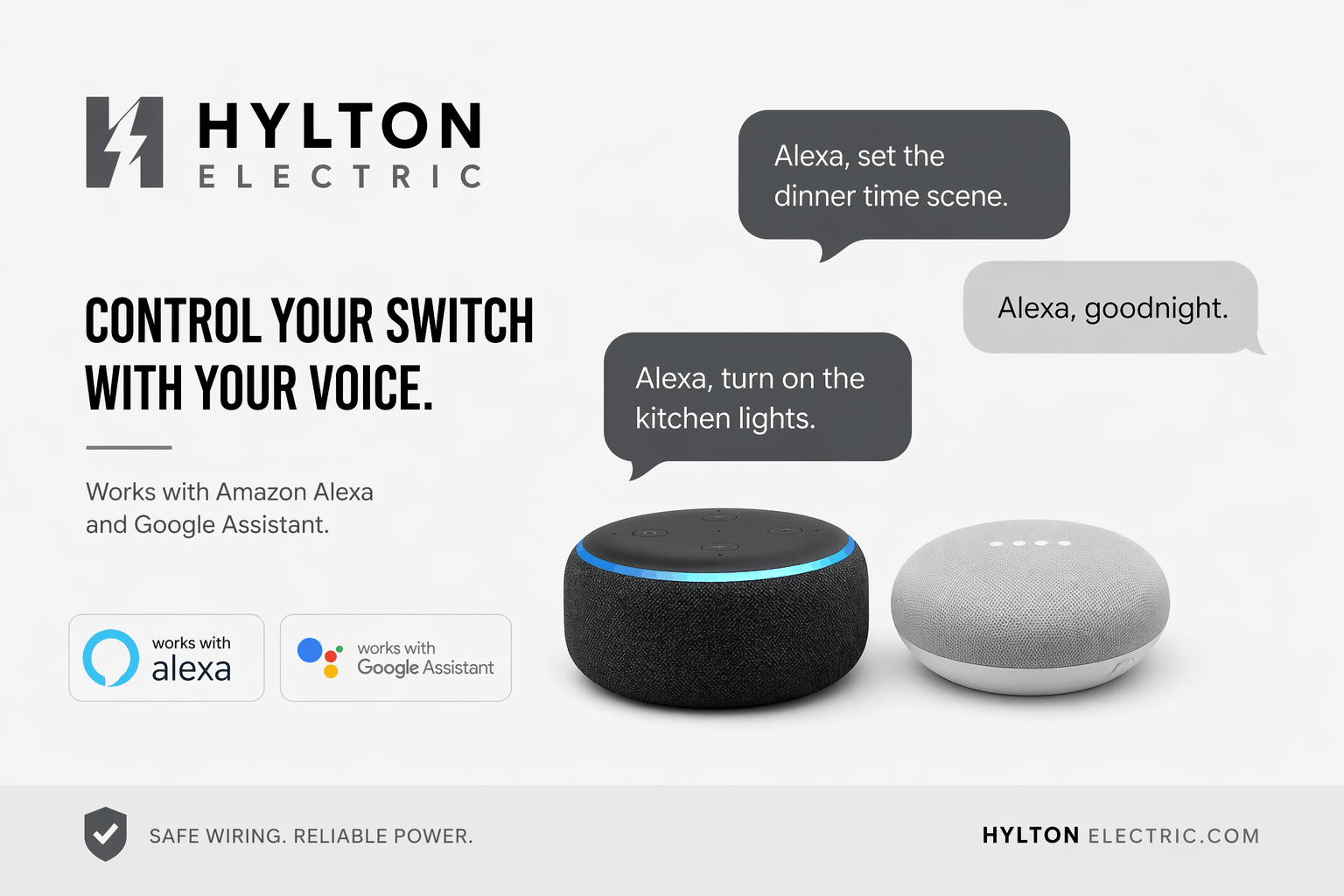
Voice control compatibility: Many dimmers work with voice assistants. You can turn lights on or adjust brightness with simple commands.
Scheduling: Set lights to turn on or off at specific times. This helps with both convenience and energy savings.
Manual control on the switch: Even with smart features, a responsive wall control is important. It should feel smooth and easy to use.
These core features cover most everyday needs and ensure a smooth experience.
Advanced Features
Some smart dimmers offer extra features that add more control and flexibility.
Scene control: You can create lighting setups for different activities. For example, a dim setting for movie nights or a brighter light for cleaning.
Motion detection: Lights can turn on when someone enters a room. This works well for hallways and bathrooms.
Energy monitoring: Some systems track how much electricity your lights use. This helps you manage energy more effectively.
Multi-room control: You can manage several switches at once through one app.
While not required, these features can improve comfort and efficiency in the long run.
Compatibility Checklist
Before buying a smart dimmer, confirm that it works with your setup.
Check these points:
-
Dimmable LED or compatible bulbs
-
Your home’s wiring (neutral or no neutral)
-
Supported smart home systems
-
Correct voltage and wattage range
A quick check now can prevent issues after installation.
Common Problems and Troubleshooting Tips
Flickering Lights
Flickering is one of the most common issues with dimmers.
Possible causes:
-
Incompatible LED bulbs
-
Incorrect dimmer type
-
Loose wiring
How to fix it:
-
Use dimmable LED bulbs
-
Check compatibility with your switch
-
Tighten all wire connections
Connectivity Issues
If your dimmer loses connection, it can affect app and voice control.
Common reasons:
-
Weak Wi-Fi signal
-
Router too far from the switch
-
App setup errors
Solutions:
-
Move your router closer or improve signal strength
-
Restart the device and reconnect
-
Follow the setup steps carefully
Dimmer Not Working Properly
Sometimes the dimmer may not respond as expected.
Possible causes:
-
Incorrect wiring
-
Load exceeding capacity
-
Faulty switch
What to do:
-
Double-check wiring connections
-
Reduce the number of connected lights
-
Replace the switch if needed
App or Voice Control Problems
If voice or app control fails, the issue is often related to syncing.
Quick fixes:
-
Reconnect the device in the app
-
Check account linking with your voice assistant
-
Update firmware if available
These steps usually restore full functionality.
Smart Dimmer Switch Safety Tips
Electrical Safety Best Practices
Safety should always come first when working with electricity.
Follow these basics:
-
Turn off the power before starting
-
Use a voltage tester to confirm no current
-
Handle wires carefully
-
Use proper tools
Taking these precautions reduces the risk of injury.
Florida Electrical Code Considerations
Electrical work must meet local code requirements. These rules ensure safety and proper installation.
In Florida, this includes:
-
Proper grounding
-
Correct wiring methods
-
Approved electrical components
Hiring a licensed electrician helps ensure everything meets these standards.
Fire Prevention and Load Limits
Overloading a dimmer can lead to overheating and potential fire risks.
To stay safe:
-
Stay within the wattage limit of the switch
-
Avoid connecting too many fixtures
-
Use compatible bulbs
Proper planning keeps your system safe and reliable.
Smart Lighting Ideas for Different Rooms
Living Room Lighting Setup
The living room is where lighting makes the biggest impact. It is used for relaxing, watching TV, and hosting guests. A smart dimmer helps you adjust the mood without changing fixtures.

Simple ideas:
-
Bright lighting during the day for activities
-
Soft lighting in the evening for comfort
-
Dimmed lights for movie time
You can also combine ceiling lights with lamps. This creates layered lighting that feels balanced and comfortable.
Bedroom Smart Lighting
Lighting in the bedroom should feel calm and restful. Bright lights are rarely needed here, especially at night.
Helpful setups:
-
Low brightness for winding down
-
Gradual dimming before sleep
-
Soft light for late-night use
Some homeowners also use schedules. Lights can slowly brighten in the morning to help with waking up.
Kitchen and Dining Areas
Kitchens need bright lighting for tasks. At the same time, dining areas benefit from softer light.
Best approach:
-
Use full brightness while cooking
-
Lower brightness during meals
-
Adjust lighting based on time of day
Smart dimmers make this easy. You can shift from task lighting to a relaxed dining setting in seconds.
Outdoor and Patio Lighting in Florida Homes
Outdoor lighting is especially useful in Florida, where evenings are often spent outside.
Smart uses:
-
Dim lights for a relaxed patio setting
-
Bright lighting for security when needed
-
Scheduled lighting for consistent use
This improves both comfort and safety without extra effort.
Smart Dimmer Switch vs Smart Bulbs: Which Is Better?
Key Differences Explained
Both smart dimmers and smart bulbs improve lighting, but they work in different ways.
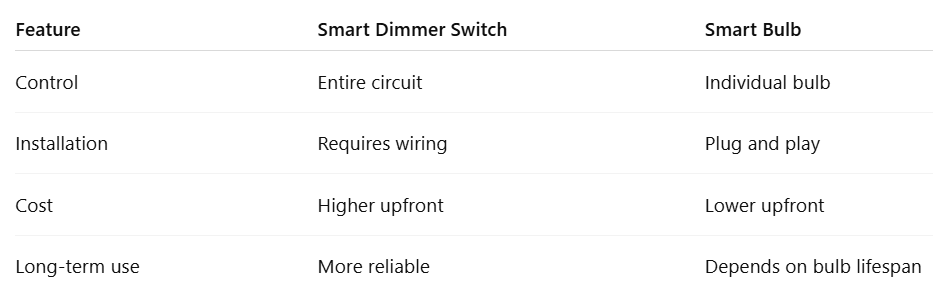
A smart dimmer controls all the lights on a switch. A smart bulb works one bulb at a time.
When to Choose Each Option
Choose a smart dimmer if:
-
You want control over ceiling or built-in lights
-
You prefer a clean wall switch setup
-
You want long-term reliability
Choose smart bulbs if:
-
You are lighting a small area
-
You want color-changing options
-
You prefer a simple installation
Each option works best in different situations.
Best Combination Strategy
Many homeowners use both for better results.
For example:
-
Use smart dimmers for main lighting
-
Use smart bulbs for lamps or accent lighting
This setup gives you full control while keeping things simple.
Future of Smart Lighting in Lakeland Homes
Growing Smart Home Trends in Florida
Smart homes are becoming more common across Florida. Lighting is often one of the first upgrades homeowners choose.
More people are looking for:
-
Easy control through mobile apps
-
Systems that work together
-
Energy-efficient solutions
Smart dimmers fit naturally into this trend.
Integration with Solar and Energy Systems
As more homes adopt solar energy, lighting systems are also improving.
Smart dimmers can:
-
Reduce energy usage
-
Work with energy-saving setups
-
Support more efficient homes
This makes them a practical choice for future-ready homes.
AI and Automation in Lighting
Lighting systems are becoming more automated.
In the future, lights may:
-
Adjust based on time of day
-
Respond to natural light levels
-
Learn your daily habits
This creates a smoother and more comfortable experience without manual control.
Why Choose a Professional Electrician in Lakeland
Benefits of Hiring Experts
Hiring a professional ensures the job is done correctly from the start.
Key benefits:
-
Safe and secure installation
-
Proper handling of wiring
-
Reduced risk of future issues
This is especially important for complex setups.
What to Look for in an Electrical Contractor
Choosing the right electrician matters.
Look for:
-
Proper licensing and insurance
-
Experience with smart home systems
-
Clear communication and pricing
A reliable contractor makes the process smooth and stress-free.
Why Homeowners Trust Professional Installations
Professional work provides peace of mind.
Homeowners value:
-
Consistent performance
-
Clean, finished results
-
Support if issues arise
In the long run, this often saves both time and money.
Conclusion: Is a Smart Dimmer Switch Worth It?
Smart dimmer switches offer a simple way to improve how your home feels and functions.
They provide:
-
Better control over lighting
-
Lower energy use
-
A more modern living space
While the upfront cost may vary, the long-term benefits make them a practical upgrade for most homes. For homeowners in Lakeland, this is a smart step toward a more efficient and comfortable home.
Thinking about upgrading your lighting? We’re here to help. Call +1 863-624-7000 or email ray@hylton-electric.com to get honest advice and a clean, safe installation. Let’s make your home lighting simple, efficient, and comfortable.
FAQs About Smart Dimmer Switch Setup in Lakeland, Florida
What is a smart dimmer switch?
A smart dimmer switch is a wall switch that lets you control light brightness, schedules, and automation through an app or voice assistant. It replaces a standard switch and adds more flexibility.
-
Adjust brightness instantly
-
Control lights remotely
-
Set schedules for daily routines
This makes lighting more efficient and easier to manage.
Do smart dimmer switches require a neutral wire?
Most smart dimmer switches require a neutral wire, but some models are designed to work without one.
-
Newer homes usually include neutral wiring
-
Older homes may need no-neutral options
-
Wiring should be checked before buying
If you are unsure, an electrician can confirm compatibility quickly.
Can I install a smart dimmer switch myself?
Yes, you can install a smart dimmer switch yourself if the wiring is simple and clearly labeled.
-
Best for single-pole switches
-
Requires basic tools and safety steps
-
Always turn off power first
For complex wiring or older homes, hiring a professional is safer.
How much does a smart dimmer switch cost in Lakeland?
A smart dimmer switch in Lakeland typically costs between $150 and $450, including installation.
-
Switch cost: $30–$150
-
Installation: $100–$300
-
Higher for complex setups
Costs vary based on wiring and switch type.
Do smart dimmer switches save electricity?
Yes, smart dimmer switches reduce electricity use by lowering brightness when full light is not needed.
-
Less energy consumption
-
Lower monthly bills
-
Longer bulb lifespan
Small adjustments can lead to noticeable savings over time.
Are smart dimmer switches compatible with LED lights?
Yes, but only with dimmable LED bulbs and compatible switches.
-
Use dimmable LEDs only
-
Check compatibility before installing
-
Prevent flickering and buzzing
The right setup ensures smooth and stable lighting.
What is the difference between a smart dimmer switch and a smart bulb?
A smart dimmer switch controls all lights on a circuit, while a smart bulb controls one bulb at a time.
-
Dimmer = whole room control
-
Bulb = individual control
-
Dimmers are better for main lighting
Most homeowners prefer dimmers for long-term use.
Can I control my smart dimmer switch remotely?
Yes, smart dimmer switches allow remote control through a mobile app.
-
Turn lights on or off from anywhere
-
Adjust brightness instantly
-
Set schedules and automation
This adds convenience and improves home security.
What problems can occur with smart dimmer switches?
Common issues include flickering, connectivity problems, or improper dimming.
-
Flickering → incompatible bulbs
-
Wi-Fi issues → weak signal
-
Not working → wiring errors
Most problems can be fixed with proper setup.
Is it worth hiring an electrician for smart dimmer switch installation?
Yes, hiring an electrician is worth it for safety and reliability, especially in complex installations.
-
Ensures correct wiring
-
Meets electrical codes
-
Reduces risk of future issues
Professional installation provides long-term peace of mind.
Leave a Reply