
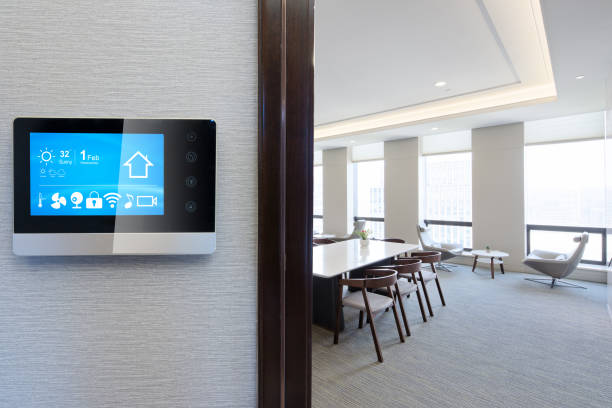
Smart lighting is no longer a luxury feature. It has become a practical upgrade for modern homes. A smart house lighting control panel brings all your lighting into one simple system. Instead of using multiple switches, you control everything from one place.
Think of it like the “brain” of your home’s lighting. It lets you adjust brightness, create moods, and automate schedules. You can also control lights remotely using your phone or voice commands.
Many homeowners now choose smart lighting for three main reasons. First, it improves comfort. Second, it reduces energy waste. Third, it adds value to the home. At the same time, it makes daily routines easier. For example, lights can turn on automatically when you enter a room. They can also dim at night without manual effort.
In this guide, you’ll learn how smart house lighting control panels work. We’ll cover their features, installation process, and real costs. This will help you decide if it’s the right upgrade for your home.
What Is a Smart House Lighting Control Panel?
A smart house lighting control panel is a central system that manages all lighting in your home. Instead of separate switches in each room, everything connects to one unified control point.
This system can be physical, like a wall-mounted panel, or digital, like a mobile app. In many homes, it’s both. As a result, you get full control whether you’re at home or away.
Let’s break it down in a simple way.
Simple Definition for Homeowners
A smart lighting control panel is a device or system that lets you control multiple lights from one place.
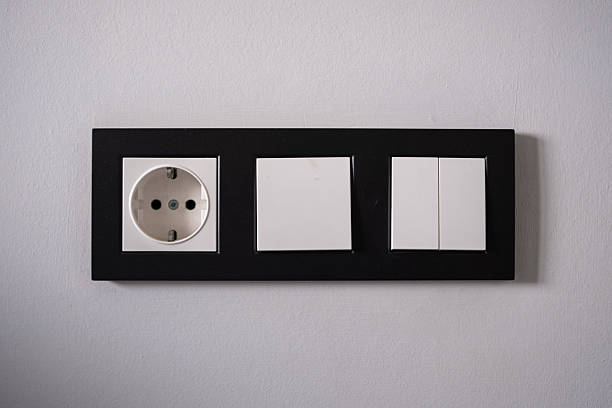
It replaces traditional switches with a smarter setup. Instead of turning lights on or off one by one, you can control entire rooms or even the whole house at once.
For example:
-
Turn off all lights before leaving home
-
Dim the lights for a movie night
-
Set lights to turn on at sunset
Everything works together in a smooth, connected way.
How Smart Lighting Control Panels Work
The system works through three basic parts:
-
Input: This is how you give commands. It can be a switch, an app, or a voice command.
-
Controller: This is the control panel or hub. It processes your command.
-
Output: This is the light fixture responding to your command.
All these parts communicate through wired or wireless connections. In most modern homes, wireless systems are common because they are easier to install.
Once installed, the system allows automation. That means lights can respond without manual input. For instance, they can turn on when motion is detected or adjust based on daylight.
Control Methods Explained
Smart lighting panels offer several ways to control your lights. This flexibility is one of their biggest advantages.
-
Wall-Mounted Panels – These look like modern touchscreens or sleek switches. They are installed in key areas of the home.
-
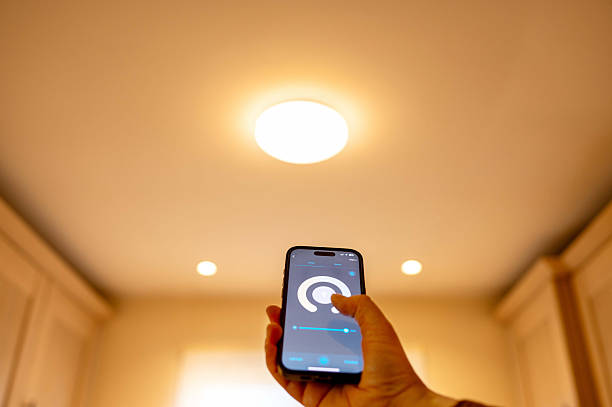
Mobile Apps – You can control lighting from your smartphone. This works even when you are not at home.
-
Voice Control – Many systems connect with voice assistants. You can simply say a command to adjust lights.
-
Sensors – Motion or daylight sensors automate lighting. This improves convenience and saves energy.
Each method works together. So, you are never limited to just one way of control.
Smart Panels vs Traditional Switches
Here’s how smart lighting control panels compare to standard switches:
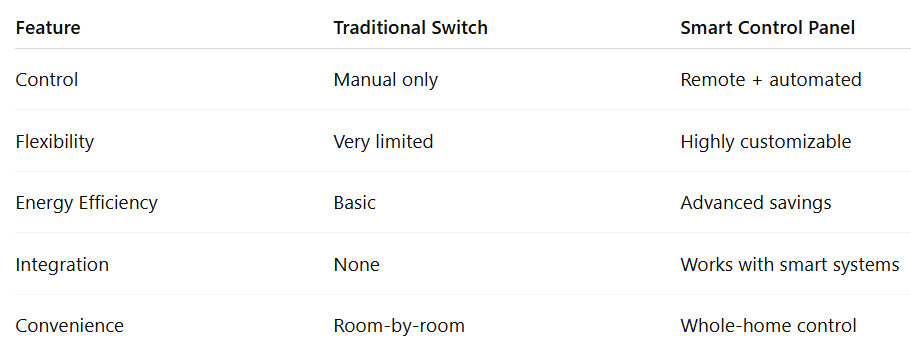
Traditional switches still do the job. However, they lack flexibility. In contrast, smart panels give you more control and better efficiency.
Types of Smart Lighting Control Panels
Not all smart lighting systems are the same. The right choice depends on your home, budget, and how much control you want. Some systems are better for new construction, while others are ideal for upgrades.
Understanding the main types will help you make a smart decision.
Wired Lighting Control Panels
Wired systems connect through physical cables inside your walls. These are often used in new homes or full renovations. They offer strong and stable performance. Since they don’t rely on wireless signals, they are less likely to face connection issues.
Key points:
-
Very reliable connection
-
Ideal for large homes
-
Supports advanced automation
-
Requires professional installation
However, installation can be more complex. Walls may need to be opened, which increases cost and time.
Wireless Smart Lighting Panels
Wireless systems use technologies like Wi-Fi, Zigbee, or Z-Wave. They are the most common choice for existing homes. These systems are easier to install because they do not require major wiring changes.
Key points:
-
Quick and easy setup
-
Great for retrofitting older homes
-
Lower installation cost
-
Flexible and scalable
On the downside, wireless systems can depend on signal strength. A weak network may affect performance.
Hybrid Systems (Wired + Wireless)
Hybrid systems combine both wired and wireless features. They offer a balance between reliability and flexibility. For example, core areas of the home may use wired connections, while less critical areas use wireless devices.
Why homeowners choose hybrid systems:
-
Reliable performance in key areas
-
Easier expansion over time
-
Better control across large spaces
This option works well for homeowners who want long-term flexibility without full rewiring.
Centralized vs Decentralized Panels
Another important distinction is how the system is structured.
Centralized Systems
-
One main panel controls all lighting
-
Often installed in a utility room or control cabinet
-
Clean wall design with fewer switches
Decentralized Systems
-
Each room has its own control unit
-
Easier to install and expand
-
More visible switches and controls
Quick comparison:
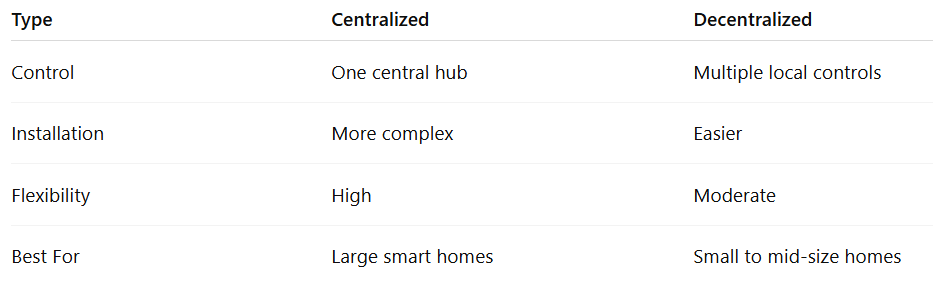
Choosing the right type depends on your goals. If you want a fully integrated smart home, a centralized or wired system may be the best fit. On the other hand, if you want a simple upgrade, wireless or decentralized systems work well.
Key Features of Smart House Lighting Control Panels
Smart lighting control panels are popular for a reason. They offer much more than simple on-and-off control. Instead, they give you flexibility, comfort, and better energy use.
Let’s look at the features that make these systems worth the investment.
Remote Access and Mobile Control
One of the biggest advantages is remote access. You can control your lights from anywhere using a smartphone.
For example, if you forget to turn off the lights before leaving, you can fix it instantly. This adds both convenience and peace of mind.
Many apps also give you a clear view of your entire home’s lighting. So, you always know what’s on and what’s off.
Scene Setting and Automation
Scene control allows you to set multiple lights with one command. Instead of adjusting each light manually, you create presets.
Common examples include:
-
Movie mode (dim lights)
-
Dinner mode (warm lighting)
-
Night mode (low brightness)
Automation takes this further. Lights can adjust based on time, activity, or routines. As a result, your home adapts to your lifestyle.
Dimming and Brightness Control
Smart panels let you control brightness levels with precision. This helps create the right mood for different situations. Dimming also reduces energy use. Lower brightness means less electricity consumption, which lowers your bills over time.
Color Temperature and RGB Control
Modern systems allow you to adjust color temperature. You can switch between warm and cool lighting easily.
-
Warm light feels relaxing
-
Cool light improves focus
Some systems also support RGB lighting. This lets you change colors for events or special settings.
Scheduling and Timers
Scheduling is one of the most practical features. You can set lights to turn on or off at specific times.
For example:
-
Turn on porch lights at sunset
-
Turn off bedroom lights at midnight
This adds both convenience and security without daily effort.
Motion and Occupancy Sensors
Sensors allow lights to respond automatically. When someone enters a room, lights turn on. When the room is empty, they turn off.
This is especially useful for:
-
Hallways
-
Bathrooms
-
Garages
It also helps reduce wasted energy.
Voice Control Integration
Many smart lighting systems connect with voice assistants like Amazon Alexa and Google Home.
You can control lights with simple voice commands. For example:
-
“Turn off the living room lights.”
-
“Dim bedroom lights to 50%”
This makes daily use faster and more natural.
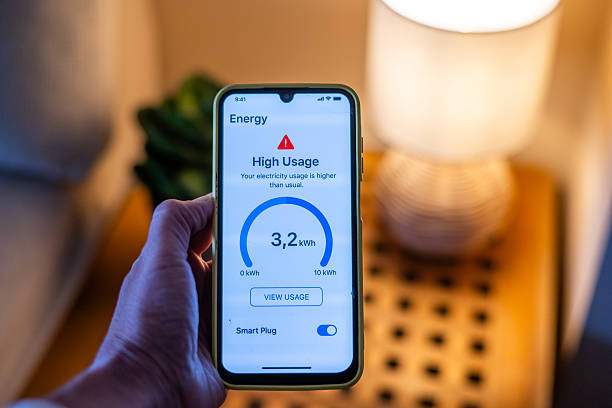
Energy Monitoring and Savings
Some advanced systems track how much energy your lighting uses. This helps you understand where you can save. Over time, small changes in usage can lead to noticeable savings. Combined with LED lighting, the impact becomes even greater.
Multi-Room and Group Control
Smart panels allow you to control multiple rooms at once. You can group lights together for easier management.
For example:
-
Turn off all downstairs lights with one tap
-
Control outdoor lighting separately
This is especially helpful in larger homes.
Smart lighting control panels are designed to simplify everyday life. Instead of adjusting lights manually, everything works together in a smooth and efficient way.
Benefits of Installing Smart Lighting Control Panels
Smart lighting control panels are not just about technology. They solve everyday problems in a simple way. From saving energy to improving comfort, the benefits are easy to notice once the system is in place.
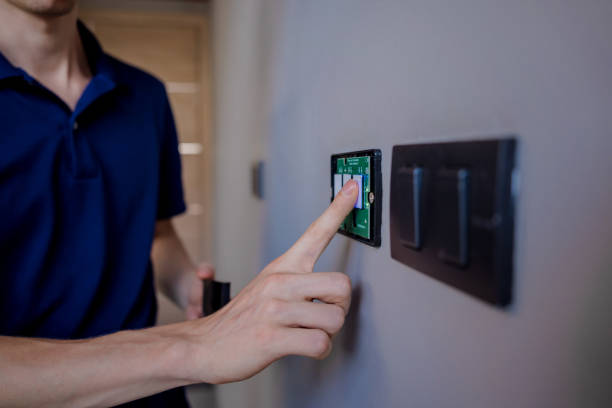
Let’s look at how these systems make a real difference in your home.
Convenience and Ease of Use
One of the biggest advantages is convenience. You no longer need to walk from room to room to manage lights.
With a smart panel, you can:
-
Control all lights from one screen
-
Turn everything off before leaving home
-
Adjust settings without getting up
Over time, this saves effort and makes daily routines smoother. It also reduces the chances of forgetting lights on.
Energy Efficiency and Cost Savings
Smart lighting helps reduce unnecessary energy use. Lights turn off automatically when not needed. They can also dim based on natural daylight.
Here’s how it saves energy:
-
Motion sensors prevent lights from staying on
-
Schedules reduce overnight usage
-
Dimming lowers power consumption
Even small changes can lower monthly electricity bills. Over a year, the savings become more noticeable.
Enhanced Home Security
Lighting plays a key role in home security. A well-lit home looks occupied, even when you’re away.
Smart systems allow you to:
-
Schedule lights to turn on at night
-
Control lights remotely while traveling
-
Create random lighting patterns for added safety
This can help discourage unwanted activity around your home.
Improved Comfort and Ambience
Lighting affects how a space feels. Smart panels let you adjust brightness and tone based on your needs.
For example:
-
Soft lighting for relaxing evenings
-
Bright lighting for work or reading
-
Warm tones for a cozy atmosphere
You can create the right setting without changing bulbs or switches.
Increased Property Value
Smart home features are in high demand. Buyers often look for homes with modern systems already installed.
A smart lighting control panel can:
-
Make your home more attractive to buyers
-
Show that the property is updated
-
Add a premium feel to the space
Even if you are not selling soon, it still improves the overall value of your home.
Smart lighting control panels bring both comfort and practical benefits. They simplify daily tasks while helping you save energy and improve security.
Components of a Smart Lighting Control System
A smart lighting system works smoothly because several parts connect and communicate with each other. Each component plays a specific role. When combined, they create a complete and efficient setup. Understanding these parts helps you plan your system better and avoid confusion during installation.
Control Panel or Hub
The control panel is the center of the system. It acts like the brain that manages all lighting commands. It can be a wall-mounted touchscreen or a hidden hub installed in a control cabinet. Some systems use both.
What it does:
-
Receives commands from apps, switches, or voice
-
Sends signals to lights and devices
-
Stores automation settings and schedules
Without the control panel, the system cannot function as one unified setup.
Smart Switches and Dimmers
Smart switches replace traditional switches. They allow you to control lights manually while still being connected to the system. Dimmers add more flexibility. Instead of just turning lights on or off, you can adjust brightness levels.
Benefits:
-
Easy to use for all family members
-
Works even without a phone
-
Improves energy efficiency through dimming
These are often installed in the same locations as existing switches.
Smart Bulbs and Fixtures
Smart bulbs are designed to respond to commands from the control panel. Many of them support dimming and color changes. In some cases, entire fixtures are smart-enabled instead of just the bulb.
Options include:
-
Standard smart LED bulbs
-
Color-changing bulbs
-
Integrated smart light fixtures
These are essential for creating scenes and automation.
Sensors (Motion, Light, Occupancy)
Sensors help automate lighting without manual input. They detect activity or environmental changes.
Common types:
-
Motion sensors (detect movement)
-
Occupancy sensors (detect presence)
-
Daylight sensors (adjust based on natural light)
These are useful in areas like hallways, bathrooms, and outdoor spaces. They also help reduce wasted energy.
Mobile Apps and Software
Most smart lighting systems come with a mobile app. This is where you control and customize everything.
Through the app, you can:
-
Turn lights on or off remotely
-
Create schedules and scenes
-
Monitor energy usage
Apps are designed to be simple, so you don’t need technical knowledge to use them.
Integration with Other Smart Home Systems
Smart lighting often works with other systems in your home. This creates a more connected living experience.
Examples include:
-
HVAC systems (adjust lighting with temperature settings)
-
Security systems (lights react to alarms)
-
Entertainment systems (sync lighting with TV or music)
This level of integration makes your home more responsive and efficient.
Each component plays an important role. When combined, they create a system that is easy to control, energy-efficient, and built for modern living.
Smart Lighting Control Panel Installation Guide
Installing a smart lighting control panel is not just about replacing switches. It involves planning, wiring, setup, and testing. When done correctly, the system works smoothly from day one.
Let’s walk through the process step by step.
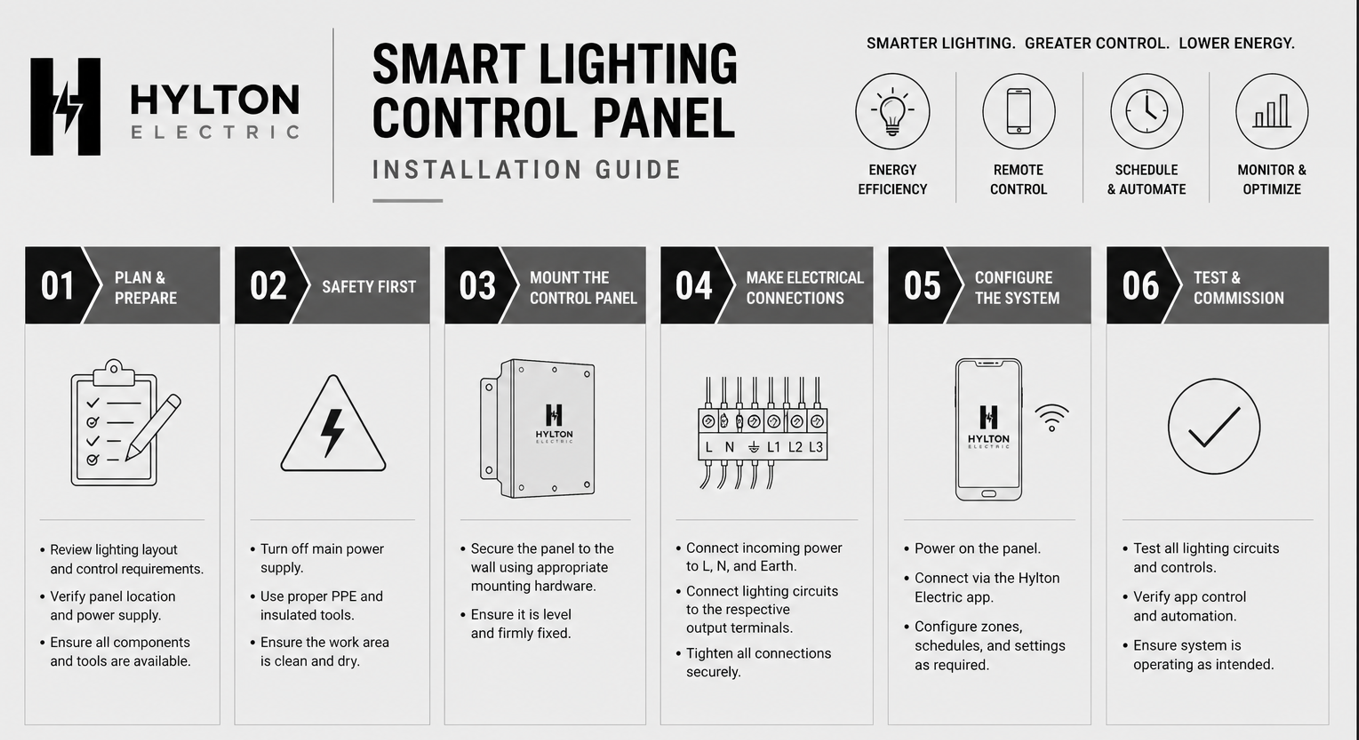
Step 1 – Planning and Design
Every successful installation starts with a clear plan. Before any wiring begins, you need to understand how your home uses lighting.
Start by asking:
-
Which rooms need smart control?
-
Do you want full-home automation or just key areas?
-
What type of lighting do you currently have?
Next, divide your home into lighting zones. For example:
-
Living room
-
Kitchen
-
Bedrooms
-
Outdoor areas
Planning also includes deciding where control panels and switches will go. This step prevents costly changes later.
Step 2 – Choosing the Right System
Once the plan is ready, the next step is selecting the system.
You’ll need to decide between:
-
Wired systems (best for new construction)
-
Wireless systems (ideal for upgrades)
-
Hybrid systems (a mix of both)
Also, consider:
-
Compatibility with your existing wiring
-
App and control features
-
Future expansion options
Choosing the right system early makes installation smoother.
Step 3 – Electrical Preparation
Before installing devices, the electrical setup must be ready.
This may include:
-
Checking existing wiring
-
Upgrading electrical panels if needed
-
Running new cables for wired systems
Safety is very important here. Electrical work must follow proper standards. In many cases, this step requires a licensed electrician.
Step 4 – Installing Control Panels and Devices
Now comes the physical installation.
This includes:
-
Mounting the control panel on the wall or in a cabinet
-
Replacing traditional switches with smart switches
-
Installing dimmers and sensors
-
Connecting smart bulbs or fixtures
Each device must be installed correctly to ensure proper communication within the system.
Step 5 – System Configuration
After installation, the system needs to be set up digitally.
This involves:
-
Connecting devices to the network
-
Installing the mobile app
-
Pairing all components
-
Creating lighting scenes and schedules
This step turns a basic setup into a fully functional smart system.
Step 6 – Testing and Optimization
The final step is testing everything.
Check:
-
If all lights respond correctly
-
If automation works as expected
-
If remote access is functioning
You can also fine-tune settings:
-
Adjust brightness levels
-
Modify schedules
-
Improve sensor sensitivity
Testing ensures the system runs smoothly in daily use.
Installing a smart lighting control panel is a detailed process. While small setups can be simple, full-home systems require careful planning and expert handling. Done right, the result is a reliable and efficient lighting system that enhances your entire home.
DIY vs Professional Installation
When it comes to smart lighting control panels, installation is a key decision. Some setups are simple enough to handle on your own. Others require professional experience to avoid problems.
Choosing the right approach can save time, money, and future headaches.
When DIY Installation Works
DIY installation is a good option for smaller systems. These usually involve wireless devices that are easy to set up.
You can handle it yourself if:
-
You are installing smart bulbs or plug-in devices
-
The system uses Wi-Fi or app-based control
-
No major wiring changes are needed
Typical DIY tasks include:
-
Replacing bulbs with smart bulbs
-
Setting up mobile apps
-
Connecting devices to your home network
DIY setups are quick and cost-effective. However, they are best suited for basic lighting control, not full-home automation.
When to Hire a Professional Electrician
For larger or more advanced systems, hiring a professional is the safer choice. This is especially true for homes that require new wiring or panel installation.
You should hire an electrician if:
-
You are installing a centralized control panel
-
Wiring needs to be upgraded or extended
-
You want full-home automation
-
You are integrating multiple smart systems
Professionals ensure everything is installed correctly and safely. They also help with system design, which improves performance in the long run.
For homeowners looking for reliable results, working with an experienced electrical service like Hylton Electric ensures the system is set up properly from the start.
Risks of Improper Installation
Improper installation can lead to several issues. While some problems are minor, others can affect safety and system performance.
Common risks include:
-
Electrical hazards due to incorrect wiring
-
Devices not syncing properly
-
Poor network connectivity
-
Reduced system lifespan
In some cases, fixing these issues later can cost more than doing it right the first time.
DIY installation works well for simple upgrades. However, for a complete smart lighting system, professional installation offers better reliability, safety, and long-term value.
Cost of Smart House Lighting Control Panels
The cost of a smart lighting control panel can vary a lot. It depends on your home size, the type of system, and the features you choose. Some homeowners start small with a few smart switches. Others invest in full-home automation.
Understanding the cost early helps you plan your budget and avoid surprises.
Average Cost Per Room
For a single room, the cost depends on how advanced the setup is.
Typical range:
-
Basic setup: $200 – $500
-
Mid-range setup: $500 – $1,000
-
Advanced setup: $1,000 – $2,000+
A basic system may include a smart switch and a few bulbs. On the other hand, advanced setups include dimmers, sensors, and full automation.
Whole House System Cost
If you want to automate your entire home, the cost increases.
Estimated range:
-
Small homes: $3,000 – $5,000
-
Mid-size homes: $5,000 – $10,000
-
Large or luxury homes: $10,000+
The final price depends on how many rooms you include and how complex the system is.
Cost Breakdown Table
Here’s a simple breakdown of common components:
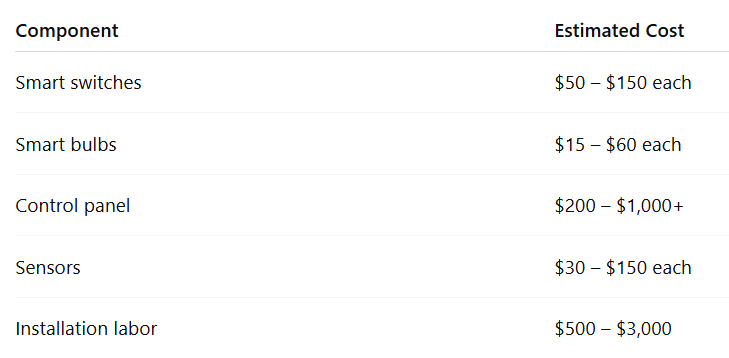
This table gives a general idea. Actual costs may vary based on your location and system choice.
Factors That Affect Cost
Several factors influence the total cost of your smart lighting system.
Main factors include:
-
Size of your home
-
Number of rooms and lighting zones
-
Type of system (wired vs wireless)
-
Features like automation and sensors
-
Brand and product quality
-
Labor and installation complexity
The more advanced the system, the higher the cost. However, it also offers more control and convenience.
Long-Term Savings
While the upfront cost may seem high, smart lighting can save money over time.
How you save:
-
Reduced electricity usage
-
Longer lifespan of LED bulbs
-
Less need for manual control
Automation ensures lights are only used when needed. Over time, this leads to lower utility bills.
Best Smart Lighting Control Panel Brands
Choosing the right brand is just as important as choosing the system type. Different brands offer different levels of control, design, and reliability. Some focus on high-end automation, while others are better for simple upgrades.
Here’s a clear breakdown to help you decide.
High-End Systems
High-end brands are designed for full-home automation. They offer advanced features, seamless integration, and premium build quality.
Two of the most recognized names are Crestron and Control4.
What you get with high-end systems:
-
Fully customized lighting scenes
-
Integration with audio, security, and climate systems
-
Centralized control panels with sleek interfaces
-
Professional installation and support
These systems are ideal for large homes or luxury projects. However, they come with higher costs.
Mid-Range Systems
Mid-range brands offer a balance between cost and features. They are popular for homeowners who want smart control without going fully custom.
Well-known options include Lutron and HDL Automation.
Why choose mid-range systems:
-
Reliable performance
-
Good app and automation features
-
Easier installation compared to high-end systems
-
More affordable pricing
These systems work well for both new homes and upgrades.
Budget-Friendly Options
Budget systems are great for simple setups. They focus on basic smart control and easy installation.
Many of these systems use platforms like Tuya.
What to expect:
-
Lower upfront cost
-
App-based control
-
Limited customization compared to premium brands
-
Suitable for small homes or apartments
While they may not offer advanced automation, they are a good starting point.
How to Choose the Right Brand
Choosing the right brand depends on your needs, not just your budget.
Consider the following:
-
Home size: Larger homes need more robust systems
-
Features: Decide if you need full automation or basic control
-
Compatibility: Make sure it works with your existing devices
-
Future expansion: Choose a system you can upgrade later
It’s also helpful to consult professionals before making a final decision. An experienced team like Hylton Electric can guide you toward the right system based on your home and goals.
Smart Lighting Use Cases (Room-by-Room)
Smart lighting control panels are most effective when tailored to how each room is used. Every space in your home has different lighting needs. With the right setup, you can improve comfort, efficiency, and functionality in each area.
Let’s look at how smart lighting works in different parts of the home.
Living Room
The living room is often the most used space. It needs flexible lighting for different activities.
Common uses:
-
Bright lighting for gatherings
-
Dim lighting for watching TV
-
Accent lighting for décor
You can create scenes like:
-
Movie mode (dim lights)
-
Guest mode (balanced brightness)
With one tap, the entire room adjusts to your needs.
Bedroom
Lighting in the bedroom should support rest and relaxation. Smart systems make it easy to create a calm environment.
Useful features:
-
Gradual dimming at night
-
Soft lighting for winding down
-
Scheduled lights in the morning
For example, lights can slowly brighten to help you wake up naturally.
Kitchen
The kitchen needs bright and focused lighting. At the same time, it should adapt to different times of the day.
Lighting needs include:
-
Task lighting for cooking
-
Ambient lighting for dining
-
Night lighting for late hours
Smart controls allow you to switch between these modes instantly.
Bathroom
Bathrooms benefit from automation and safety. Lighting should respond quickly and efficiently.
Best features:
-
Motion-activated lights
-
Soft lighting during nighttime
-
Bright lighting for grooming
This setup improves both comfort and energy savings.
Outdoor Lighting
Outdoor lighting adds both security and style. Smart systems make it easier to manage exterior lights.
Common uses:
-
Scheduled lighting at sunset
-
Motion-based security lighting
-
Landscape and pathway lighting
You can also control outdoor lights remotely, which is useful when you are away from home.
Common Problems and Troubleshooting
Smart lighting systems are reliable, but like any technology, small issues can come up. The good news is that most problems are easy to fix once you know what to look for.
Here are the most common issues homeowners face and how to handle them.
Connectivity Issues
Connectivity problems are one of the most common concerns. If your system relies on Wi-Fi or wireless signals, a weak connection can affect performance.
Possible causes:
-
Weak Wi-Fi signal
-
Network interference
-
Devices too far from the router
Simple fixes:
-
Move your router closer to devices
-
Use a Wi-Fi extender
-
Restart your router and smart devices
A stable network is key to smooth operation.
App Not Responding
Sometimes the mobile app may stop responding or fail to connect to your system.
Possible reasons:
-
App needs an update
-
Phone not connected to the correct network
-
Temporary software glitch
What you can do:
-
Update the app
-
Log out and log back in
-
Restart your phone
Most app issues are resolved with a quick reset or update.
Lights Not Syncing Properly
If the lights are not responding together, there may be a syncing issue.
Common causes:
-
Devices not properly paired
-
Signal delay in wireless systems
-
Incorrect grouping in the app
Fixes:
-
Reconnect the devices
-
Check group settings in the app
-
Reset the affected lights
Proper setup during installation helps prevent this issue.
Power Failures or System Reset
Power outages can sometimes reset parts of your system. This may cause lights to lose their settings.
What may happen:
-
The lights turn on unexpectedly
-
Schedules stop working
-
Devices disconnect from the system
How to fix it:
-
Reconnect devices to the system
-
Check automation settings
-
Use backup power options if needed
Smart lighting systems are designed to be user-friendly. Most issues are minor and can be fixed quickly. However, if problems continue, it’s best to contact a professional service like Hylton Electric to ensure everything is working correctly.
Future Trends in Smart Lighting Control Panels
Smart lighting continues to improve every year. What started as a simple remote control has now become a fully connected system. As technology advances, lighting systems are becoming more intelligent and responsive.
Here are the key trends shaping the future of smart lighting.
AI-Based Automation
Artificial intelligence is starting to play a bigger role in home lighting. Instead of setting schedules manually, systems can learn your habits over time.
For example:
-
Lights adjust based on your daily routine
-
Brightness changes depending on activity
-
Frequently used settings are applied automatically
This reduces the need for constant adjustments. The system becomes more personalized with use.
Voice and Gesture Control
Voice control is already common, but it is becoming more advanced. Systems are improving in accuracy and response time. In addition, gesture control is emerging. This allows you to control lights with simple hand movements.
Voice assistants like Amazon Alexa and Google Home continue to expand their capabilities, making smart lighting easier to use.
Integration with Smart Cities
Smart homes are slowly becoming part of larger connected systems. In the future, lighting may integrate with city-wide networks.
Possible developments include:
-
Street lighting syncing with home systems
-
Energy usage balancing across neighborhoods
-
Better efficiency during peak hours
While this is still developing, it shows where the technology is heading.
Advanced Energy Optimization
Energy efficiency will remain a major focus. Future systems will go beyond simple scheduling.
Expected improvements:
-
Real-time energy tracking
-
Automatic adjustments based on electricity rates
-
Better use of natural daylight
These features will help homeowners reduce costs even further.
Smart lighting control panels are evolving quickly. As new features are introduced, homes will become more efficient, comfortable, and easier to manage.
Conclusion
Smart house lighting control panels offer more than just convenience. They bring together comfort, efficiency, and modern living in one system.
From simple remote control to full automation, these systems give you complete control over your home’s lighting. You can adjust brightness, create scenes, and schedule lights based on your daily routine. At the same time, you reduce energy waste and improve security.
While the initial cost may vary, the long-term benefits make it a smart investment. Whether you start with a single room or upgrade your entire home, the impact is noticeable right away.
For homeowners who want a reliable and professional setup, working with experts like Hylton Electric ensures everything is installed correctly and performs as expected.
In the end, smart lighting is not just about technology. It’s about creating a home that works better for you every day.
Ready to upgrade your lighting? Call +1 863-624-7000 or email ray@hylton-electric.com to get expert help from Hylton Electric today.
FAQs About Smart House Lighting Control
What is a smart house lighting control panel, and how does it work?
A smart house lighting control panel is the central system that manages all lighting in your home. It connects switches, bulbs, sensors, and apps into one unified setup. Instead of controlling lights individually, you manage everything from one interface.
Here’s how it works:
-
You give a command (app, switch, or voice)
-
The panel processes that command
-
Lights respond instantly
It can also automate actions. For example, lights turn on when you enter a room or dim at night. Over time, this improves comfort and reduces energy waste. Most systems use either wired or wireless communication, depending on installation type and home setup.
What are the main benefits of installing a smart lighting control system?
Smart lighting systems offer both convenience and long-term value. They improve how your home functions daily while helping reduce energy use.
Key benefits include:
-
Easy control from one place
-
Automated schedules and scenes
-
Lower electricity bills through efficient usage
-
Better home security with timed lighting
In addition, they enhance comfort. You can adjust brightness and color based on your mood or activity. Over time, these small improvements make daily life smoother. Many homeowners also see increased property value because smart features are now highly desirable in modern homes.
How much does a smart house lighting control panel cost?
The cost depends on the size of your home and the level of automation you want. A small setup is affordable, while full-home systems require a larger investment.
Typical costs include:
-
Per room: $200–$2,000
-
Whole home: $3,000–$10,000+
-
Individual components (switches, bulbs, sensors) vary
Costs increase with advanced features like automation, sensors, and centralized panels. However, smart lighting reduces energy usage over time. This means you can recover part of the cost through lower utility bills. It’s best to plan your system based on your needs and expand gradually if needed.
Can I install a smart lighting control panel myself?
Yes, but it depends on the system type. Simple setups are often DIY-friendly, while advanced systems require professional installation.
DIY is suitable for:
-
Smart bulbs and plugs
-
App-based wireless systems
-
Small room upgrades
However, professional help is recommended if:
-
You are installing a central control panel
-
Wiring needs to be modified
-
You want full-home automation
Incorrect installation can cause performance issues or safety risks. For long-term reliability, many homeowners prefer professional installation, especially for larger systems.
What is the difference between wired and wireless smart lighting systems?
Wired and wireless systems differ mainly in installation and performance.
Wired systems:
-
Use physical cables
-
Very stable and reliable
-
Best for new construction
Wireless systems:
-
Use Wi-Fi or Zigbee
-
Easier to install
-
Ideal for existing homes
Wired systems offer stronger performance but require more work during installation. Wireless systems are flexible and cost-effective. Many homeowners choose hybrid systems to get the benefits of both.
Do smart lighting control panels work during internet outages?
Yes, but with some limitations. Most systems continue to function locally even without internet access.
What still works:
-
Wall switches and panels
-
Pre-set automation schedules
-
Basic lighting control
What may not work:
-
Remote access via mobile apps
-
Voice assistant commands
-
Cloud-based features
If your system uses a local hub, it will remain more stable during outages. For critical areas, it’s helpful to have manual control options as a backup.
Are smart lighting systems compatible with voice assistants?
Yes, most modern systems work with voice assistants like Amazon Alexa and Google Home.
This allows you to control lighting using simple voice commands.
Examples include:
-
Turning lights on or off
-
Adjusting brightness levels
-
Activating lighting scenes
Voice control adds convenience, especially when your hands are full. It also improves accessibility for all users. Before buying, always check compatibility to ensure smooth integration with your preferred assistant.
How do smart lighting panels help save energy?
Smart lighting reduces energy waste by ensuring lights are only used when needed.
Key energy-saving features:
-
Motion sensors turn lights off automatically
-
Scheduling avoids unnecessary usage
-
Dimming reduces power consumption
In addition, LED smart bulbs use less energy than traditional bulbs. Over time, these savings add up. Many systems also provide energy reports, helping you track usage and make better decisions.
Can I control multiple rooms with one smart lighting panel?
Yes, one of the main advantages of smart lighting is multi-room control. A single panel or app can manage lighting across your entire home.
You can:
-
Control each room individually
-
Group multiple rooms together
-
Turn off all lights at once
This is especially useful for larger homes. It simplifies control and saves time. You can also customize settings for each area based on how it’s used.
What features should I look for in a smart lighting control panel?
Choosing the right features depends on your needs. However, some features are essential for most homeowners.
Look for:
-
Remote access via mobile app
-
Dimming and brightness control
-
Scheduling and automation
-
Voice control compatibility
-
Energy monitoring
Advanced features like scene settings and sensor integration add more flexibility. It’s best to choose a system that can grow with your needs over time.
Are smart lighting systems safe for homes?
Yes, smart lighting systems are safe when installed correctly. They follow standard electrical safety guidelines and often include additional protections.
Safety benefits include:
-
Reduced the risk of lights being left on
-
Automated outdoor lighting for security
-
Reliable operation with proper installation
However, improper wiring or setup can create issues. That’s why professional installation is recommended for larger systems. Regular updates also help keep the system secure from software issues.
How long do smart lighting systems last?
Smart lighting systems are designed for long-term use. Most components have a lifespan similar to or longer than traditional lighting.
Typical lifespan:
-
Smart LED bulbs: 15,000–25,000 hours
-
Switches and panels: several years with proper use
Since LED technology is energy-efficient, it also reduces replacement frequency. Software updates help keep the system running smoothly over time.
Can smart lighting increase home value?
Yes, smart lighting can make your home more appealing to buyers. Many people now look for smart features when purchasing a home.
Benefits for resale:
-
Modern and upgraded appearance
-
Energy-efficient features
-
Added convenience and automation
While it may not drastically increase value alone, it improves overall appeal. Combined with other smart features, it can make your property stand out in the market.
What happens if a smart lighting device stops working?
If a device stops working, the issue is usually minor and easy to fix.
Common steps include:
-
Restarting the device
-
Checking network connection
-
Re-pairing it with the system
If the problem continues, it may require replacement or professional inspection. Most systems are designed to isolate issues, so one faulty device does not affect the entire setup.
Is it worth upgrading to a smart lighting control panel?
For most homeowners, the upgrade is worth it. It improves daily comfort while offering long-term savings.
Why it’s worth considering:
-
Simplifies lighting control
-
Reduces energy bills
-
Enhances security and convenience
You don’t need to upgrade everything at once. Many people start with one area and expand over time. This makes the transition easier and more budget-friendly.
Leave a Reply