

Planning electrical work without a clear layout often leads to mistakes, extra costs, and safety concerns. Whether you are remodeling a room, installing new lighting, adding an EV charger, or wiring a new home, having a detailed electrical plan makes the process much easier.
This is where wiring plan software becomes useful.
Instead of sketching circuits on paper, homeowners can use digital tools to create organized electrical layouts. These programs help show where outlets, switches, fixtures, panels, and circuits will be installed before any work begins.
For small projects, wiring plan software can help homeowners visualize ideas and communicate them more effectively with electricians. For larger projects, it can improve planning, reduce errors, and make it easier to prepare documents for permits and inspections.
Today, many wiring planning tools are designed for beginners. You no longer need professional engineering experience to create a basic electrical layout. Many programs use drag-and-drop symbols, automatic calculations, and ready-made templates.
However, not every software option is a good fit for every project. Some programs are designed for simple residential work, while others are built for professional contractors and electrical designers.
This guide explains how wiring plan software works, what features matter most, and how to choose the right solution for your home project.
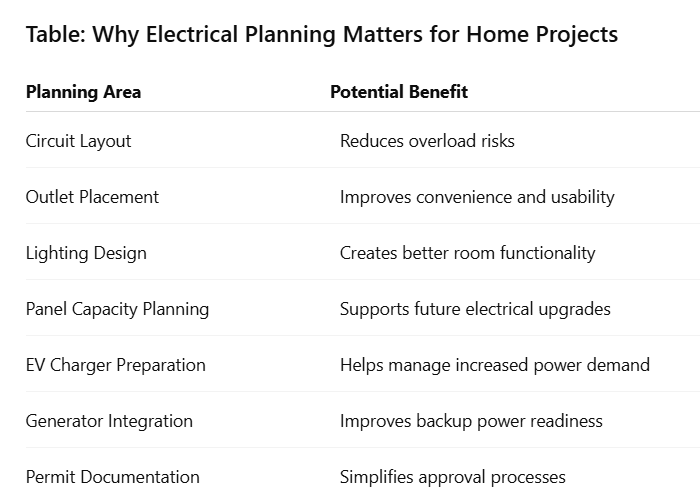
Even for smaller projects, a clear wiring plan helps avoid costly changes after installation begins. It also allows electricians to identify potential issues before they become expensive problems.
What Is Wiring Plan Software?
Wiring plan software is a digital tool used to create electrical layouts and wiring diagrams. It allows users to map out electrical systems before installation work starts.
Instead of drawing electrical plans by hand, users can place symbols representing outlets, switches, lights, panels, appliances, and circuits directly onto a digital floor plan.
The goal is simple: create a clear visual representation of how electricity will be distributed throughout a home.
How Wiring Plan Software Works
Most programs follow a similar process.
First, users import or create a floor plan. Next, they place electrical components in the appropriate locations. The software then helps connect these components through circuits and wiring paths.
Some advanced programs also include:
-
Load calculation tools
-
Panel scheduling features
-
Voltage drop calculations
-
Circuit balancing tools
-
Permit-ready documentation
These features can help identify design issues before any wiring is installed.
Common Uses for Wiring Plan Software
Homeowners use wiring plan software for many different projects, including:
-
Kitchen renovations
-
Bathroom remodels
-
Basement finishing projects
-
New home construction
-
Home office upgrades
-
Outdoor lighting projects
-
Home generator installations
-
EV charger installations
-
Smart home system planning
For example, someone installing a home EV charger may use wiring software to determine circuit routing, panel capacity requirements, and equipment placement before contacting an electrician.
Similarly, homeowners planning a standby generator can use wiring diagrams to better understand transfer switch locations and critical circuit connections.
Key Components Found in Most Wiring Plans
Most residential electrical diagrams include several core elements.
These commonly include:
-
Main electrical panel
-
Breakers
-
Outlets and receptacles
-
Light fixtures
-
Switches
-
Dedicated appliance circuits
-
Smoke detectors
-
GFCI protection locations
-
EV charging equipment
-
Generator connections
The level of detail depends on the size and complexity of the project.
Benefits of Using Wiring Plan Software
Using wiring plan software provides several practical advantages.
Some of the most important benefits include:
-
Better project organization
-
Fewer installation mistakes
-
Easier communication with electricians
-
More accurate material estimates
-
Improved safety planning
-
Better preparation for inspections
-
Easier future upgrades
A well-prepared wiring plan often saves both time and money because potential issues can be identified before work begins.
For homeowners, the biggest advantage is clarity. Instead of guessing how electrical systems will fit together, they can see the entire layout before making decisions.
Why Home Projects Need Wiring Plan Software
Many homeowners begin electrical projects with a rough idea of what they want. However, once installation starts, problems often appear. Outlets may be in the wrong place, circuits may become overloaded, or future upgrades may not have been considered.
Wiring plan software helps solve these issues before work begins.
By creating a visual layout, homeowners can see how the entire electrical system will work together. This makes planning more organized and reduces surprises during installation.
Better Project Visualization
One of the biggest advantages of wiring plan software is the ability to see the complete electrical layout before purchasing materials or hiring contractors. Instead of imagining where outlets and switches should go, homeowners can place them directly on a floor plan.
This helps answer important questions such as:
-
Are there enough outlets?
-
Are switches placed conveniently?
-
Will furniture block receptacles?
-
Is lighting distributed properly?
Finding these issues during planning is much easier than fixing them after installation.
Improved Safety Planning
Electrical safety starts long before the first wire is installed.
Proper planning helps prevent:
-
Overloaded circuits
-
Excessive extension cord use
-
Poor outlet placement
-
Insufficient panel capacity
-
Improper equipment connections
For example, a home office with multiple computers, monitors, and networking equipment may require dedicated circuits. Wiring plan software helps identify these needs early.
Easier Communication With Electricians
Many homeowners struggle to explain their ideas to contractors. A wiring diagram creates a shared reference point. Instead of describing locations verbally, homeowners can show electricians exactly where they want:
-
Outlets
-
Lighting fixtures
-
Ceiling fans
-
EV chargers
-
Generator connections
-
Smart home devices
This reduces misunderstandings and helps contractors provide more accurate estimates.
Better Budget Planning
Electrical work can become expensive when changes are made during construction.
A detailed wiring plan helps homeowners:
-
Estimate material requirements
-
Identify necessary upgrades
-
Reduce unexpected modifications
-
Compare installation options
Knowing the project scope before work begins often leads to better cost control.
Future Expansion Planning
Many homeowners focus only on their current needs. However, electrical systems should also support future upgrades.
Examples include:
-
Home EV chargers
-
Backup generators
-
Solar systems
-
Home offices
-
Workshop equipment
-
Smart home technology
Wiring plan software allows homeowners to leave room for these additions while the project is still being designed.
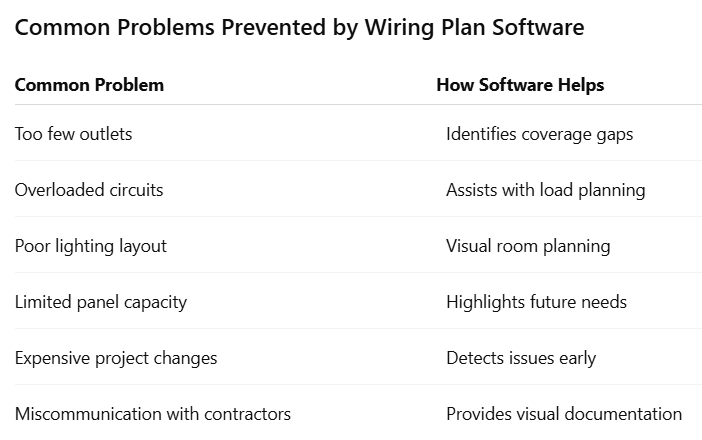
A good wiring plan does not replace professional electrical expertise. However, it gives homeowners a stronger starting point and helps create a safer, more organized project.
How Wiring Plan Software Works
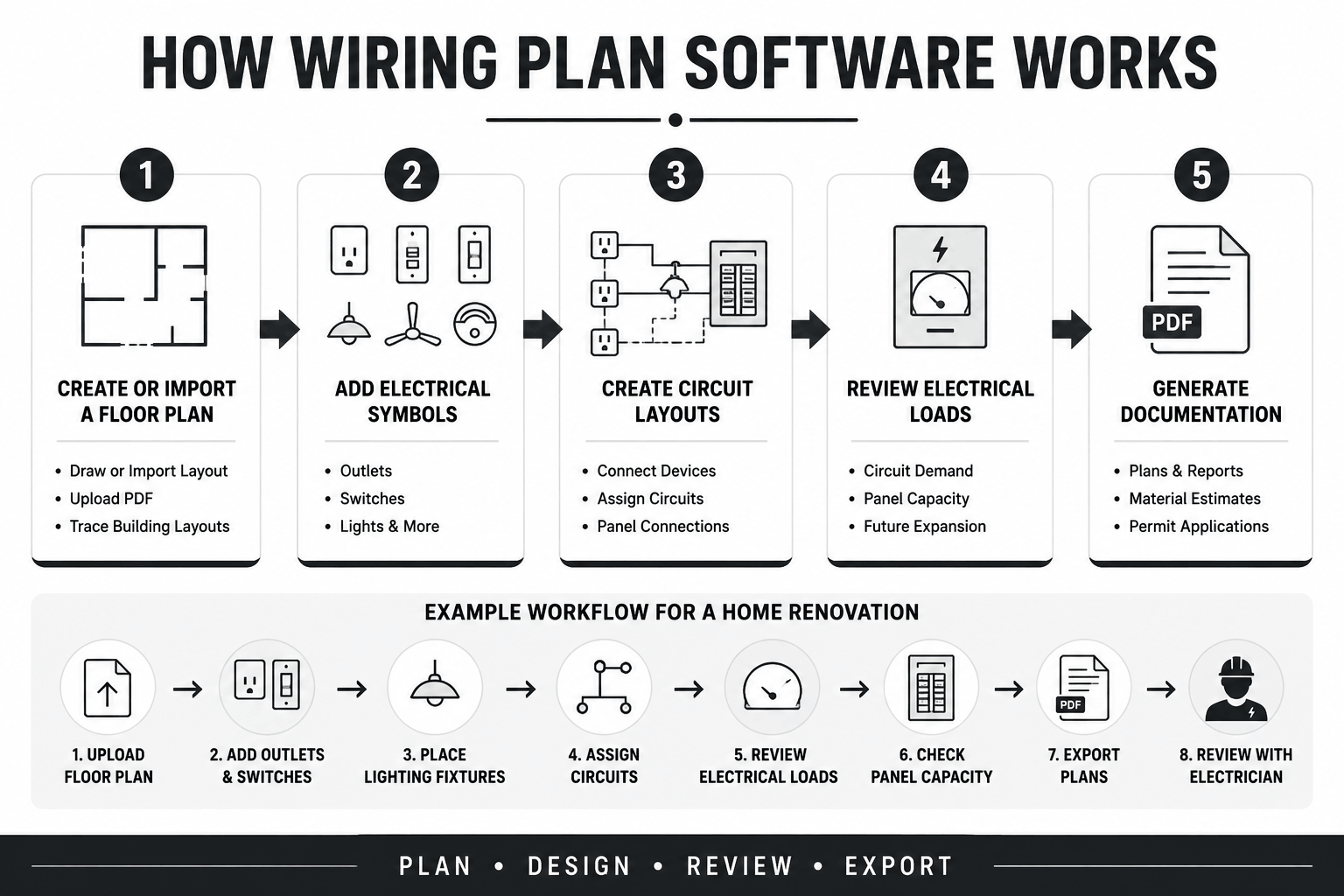
Most wiring plan software follows a simple process. Users create a floor plan, place electrical components, connect circuits, and review the final design. While advanced programs offer additional tools, the basic workflow remains similar across most platforms.
Step 1: Create or Import a Floor Plan
The first step is establishing the home’s layout.
Many programs allow users to:
-
Draw rooms manually
-
Import existing blueprints
-
Upload PDF floor plans
-
Trace building layouts
The floor plan serves as the foundation for the electrical design.
Step 2: Add Electrical Symbols
Once the layout is ready, users place electrical components throughout the home.
Common symbols include:
-
Standard outlets
-
GFCI outlets
-
Switches
-
Light fixtures
-
Ceiling fans
-
Electrical panels
-
Smoke detectors
-
EV chargers
Most software includes libraries containing hundreds of commonly used symbols.
Step 3: Create Circuit Layouts
After placing devices, users connect them to electrical circuits.
This stage helps determine:
-
Which outlets belong to each circuit
-
Lighting circuit organization
-
Dedicated appliance circuits
-
Panel connections
Advanced software may automatically suggest wiring paths and circuit assignments.
Step 4: Review Electrical Loads
One of the most valuable features in modern wiring plan software is load analysis.
The software can help estimate:
-
Circuit demand
-
Panel capacity
-
Appliance loads
-
Future expansion requirements
This step is especially important when planning:
-
EV chargers
-
Home generators
-
Workshops
-
Large kitchen remodels
Step 5: Generate Documentation
Once the plan is complete, users can export drawings and reports.
These documents may be used for:
-
Contractor discussions
-
Material estimates
-
Permit applications
-
Project records
Having documentation available also makes future troubleshooting much easier.
Example Workflow for a Home Renovation
-
Upload floor plan.
-
Add outlets and switches.
-
Place lighting fixtures.
-
Assign circuits.
-
Review electrical loads.
-
Check panel capacity.
-
Export plans.
-
Review with a licensed electrician.
This process can often be completed in a few hours for smaller residential projects.
Features to Look for in Wiring Plan Software
Not every wiring plan software package is designed for homeowners. Some programs are built for professional engineers and may include advanced functions that most residential users will never need. When choosing software for home projects, focus on features that improve planning without making the system overly complicated.
Easy-to-Use Interface
A simple interface saves time and reduces frustration.
Look for software that offers:
-
Drag-and-drop functionality
-
Clear menus
-
Easy editing tools
-
Beginner-friendly templates
The learning curve should match the complexity of your project.
Electrical Symbol Libraries
A good symbol library helps create accurate diagrams quickly.
Useful symbols include:
-
Receptacles
-
Switches
-
Lighting fixtures
-
Panels
-
Breakers
-
EV charging stations
-
Generator equipment
The more complete the library, the easier the planning process becomes.
Load Calculation Tools
Load calculations help determine whether circuits and panels can handle expected demand.
This feature becomes increasingly important for:
-
Large remodels
-
EV charger installations
-
Generator systems
-
Home additions
Software that provides automatic calculations can reduce planning errors.
Floor Plan Integration
Many homeowners already have floor plans available.
Software that allows importing:
-
PDFs
-
Images
-
CAD files
can significantly speed up project setup.
Cloud Storage and Sharing
Cloud-based software makes collaboration easier.
Benefits include:
-
Access from multiple devices
-
Easy sharing with electricians
-
Automatic backups
-
Remote project management
This feature is especially useful for larger renovation projects.
Printable Documentation
Professional-looking reports can improve communication with contractors and inspectors.
Look for export options such as:
-
PDF plans
-
Material lists
-
Wiring diagrams
-
Project summaries
Mobile Compatibility
Some homeowners prefer working from tablets or phones while walking through the property. Mobile support can make updates faster and more convenient.
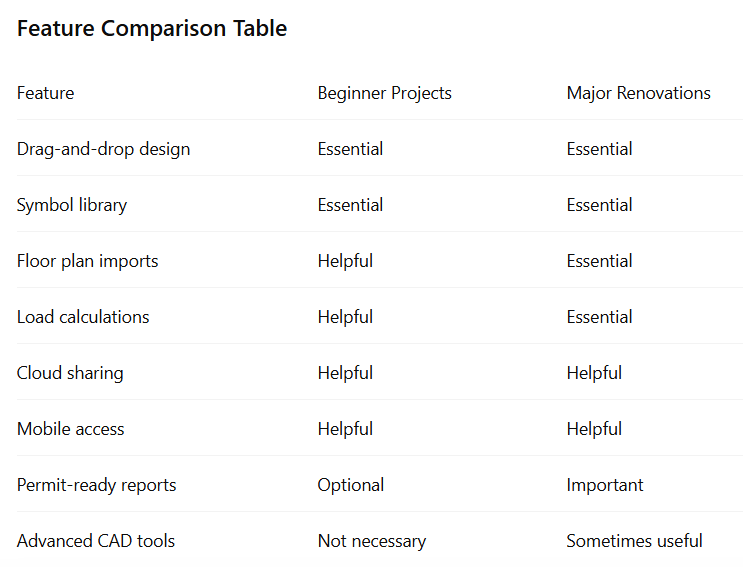
The best wiring plan software is not always the most expensive. For most homeowners, the ideal solution balances ease of use, practical features, and accurate planning tools.
Best Types of Wiring Plan Software for Home Projects
The best wiring plan software depends on the size of the project, your experience level, and the amount of detail you need. Some homeowners only need a simple layout tool. Others may need advanced features for large renovations, generator installations, or new home construction.
Understanding the different categories can help narrow your options.
Beginner-Friendly Software
Beginner-focused software is designed for homeowners with little or no electrical design experience.
These programs typically offer:
-
Drag-and-drop symbols
-
Prebuilt templates
-
Easy editing tools
-
Simple exports
They work well for:
-
Single-room remodels
-
Lighting upgrades
-
Small electrical projects
The main advantage is ease of use. Most users can create basic diagrams without extensive training.
Residential Wiring Design Software
Residential-specific software goes beyond simple diagrams.
These programs often include:
-
Circuit planning
-
Panel schedules
-
Residential electrical symbols
They are well-suited for:
-
Whole-home renovations
-
New home wiring
-
Major additions
Many homeowners find this category offers the best balance between features and usability.
Professional CAD-Based Software
CAD platforms are commonly used by engineers, architects, and electrical contractors.
These systems provide:
-
Highly detailed designs
-
Advanced documentation
-
Precision drafting tools
-
Engineering-level customization
While powerful, they often require significant training. For most homeowners, they provide more functionality than necessary.
Cloud-Based Electrical Planning Software
Cloud-based platforms have become increasingly popular.
Benefits include:
-
Access from any location
-
Automatic backups
-
Easy file sharing
-
Team collaboration
This is especially useful when homeowners, contractors, and designers need access to the same project files.
AI-Assisted Design Tools
Some newer programs include artificial intelligence features.
These tools may help:
-
Suggest outlet placement
-
Recommend circuit layouts
-
Detect design conflicts
-
Improve project organization
While useful, homeowners should still verify all recommendations with a qualified electrician.
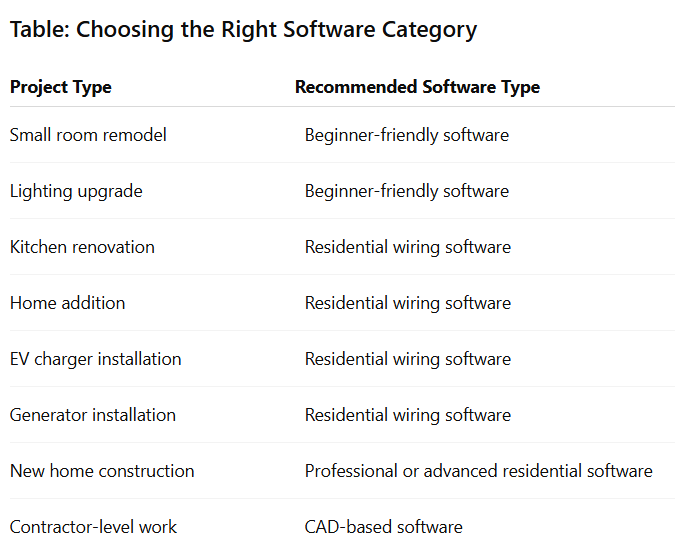
The best software is the one that provides enough detail for your project without creating unnecessary complexity.
Wiring Plan Software vs Hand-Drawn Electrical Plans
For years, homeowners sketched electrical layouts on graph paper. While that method still works for very small projects, digital planning tools offer several advantages.
As electrical systems become more complex, software can help improve accuracy and organization.
Accuracy Comparison
Hand-drawn plans depend entirely on the user’s measurements and calculations.
Software often provides:
-
Grid alignment
-
Automatic scaling
-
Consistent symbols
-
More precise layouts
This helps reduce planning mistakes before installation begins.
Easier Updates and Revisions
Home projects frequently change during planning.
With hand drawings, revisions often require starting over.
With software, users can:
-
Move outlets
-
Relocate switches
-
Change lighting layouts
-
Update circuit assignments
in just a few clicks.
Better Documentation
Digital plans are easier to store, share, and print.
Homeowners can send files directly to:
-
Electricians
-
Contractors
-
Inspectors
-
Designers
This improves communication throughout the project.
Improved Long-Term Record Keeping
Years after a project is completed, wiring diagrams can still be valuable.
Homeowners may need records for:
-
Future renovations
-
Electrical repairs
-
Panel upgrades
-
Generator additions
-
EV charger installations
Digital files are much easier to preserve than paper sketches.
Choosing Wiring Plan Software Based on Project Type
Not every home project requires the same level of planning. A simple bedroom lighting upgrade needs far less detail than a whole-home renovation or generator installation. Matching the software to the project helps avoid unnecessary costs and complexity.
Small Room Remodels
Small remodels usually require basic planning features.
Examples include:
-
Bedroom renovations
-
Home office updates
-
Bathroom upgrades
Look for software that focuses on:
-
Outlet placement
-
Lighting layouts
-
Simple diagrams
Advanced engineering features are usually unnecessary.
Kitchen Renovations
Kitchens contain some of the highest electrical demands in a home.
Projects often involve:
-
Dedicated appliance circuits
-
Under-cabinet lighting
-
GFCI protection
-
Additional receptacles
Software with load planning tools becomes more valuable in these situations.
Whole-Home Renovations
Large renovations require more detailed planning.
Key considerations include:
-
Panel capacity
-
Circuit organization
-
Future expansion
-
Electrical code requirements
Residential design software often provides the best balance of features.
Home Generator Projects
Generator installations require careful planning.
Software can help identify:
-
Critical circuits
-
Transfer switch locations
-
Panel connections
-
Equipment placement
These projects should always be reviewed by a licensed electrician.
Home EV Charger Installations
Electric vehicles place a significant demand on residential electrical systems.
Planning software can help determine:
-
Charger location
-
Circuit requirements
-
Panel capacity
-
Wiring routes
This helps homeowners understand whether panel upgrades may be needed before installation.
New Home Construction
New construction projects require the highest level of planning.
Designs typically include:
-
Complete circuit layouts
-
Lighting plans
-
Appliance circuits
-
Communication wiring
-
Future expansion provisions
More advanced software may be worthwhile for projects of this size.
Planning an EV charger, generator, panel upgrade, or home wiring project? Hylton Electric works with homeowners, businesses, and industrial facilities across Lakeland, Polk County, and Tampa. Commercial and industrial clients can request a free quote by calling +1 863-624-7000 or emailing ray@hylton-electric.com.
Common Mistakes When Selecting Wiring Plan Software
Choosing wiring plan software may seem straightforward. However, many homeowners select a program that either lacks important features or includes tools they never use.
A poor choice can make planning more difficult and waste both time and money. Here are some of the most common mistakes to avoid.
Choosing Software Based Only on Price
Free software can work well for basic projects. However, some free tools offer limited symbols, restricted exports, or few electrical-specific features. At the same time, expensive software is not always the best option.
Instead of focusing only on price, consider:
-
Project size
-
Required features
-
Ease of use
-
Long-term value
The goal is to find software that matches your project requirements.
Ignoring Future Electrical Needs
Many homeowners plan only for current electrical demands.
However, modern homes often add:
-
EV chargers
-
Backup generators
-
Smart home devices
-
Home offices
-
Additional appliances
Choosing software with expansion planning features can help avoid redesigns later.
Selecting Overly Complex Software
Some programs are designed for engineers and electrical designers. These platforms often include advanced calculations, drafting tools, and engineering functions that most homeowners will never use.
If the software feels difficult during the trial period, it may not be the right fit. A simpler tool often produces better results for residential projects.
Overlooking Electrical Symbol Libraries
Electrical symbols are the building blocks of wiring diagrams. Without a complete symbol library, users may struggle to create accurate layouts.
Look for software that includes:
-
Receptacles
-
Switches
-
Lighting fixtures
-
Panels
-
Breakers
-
EV chargers
-
Generator equipment
A strong symbol library saves time and improves diagram quality.
Not Checking Export Options
At some point, most homeowners need to share plans with an electrician or contractor. Before choosing software, verify that it can export files in common formats such as:
-
PDF
-
Image files
-
Printable diagrams
This makes collaboration much easier.
Skipping Reviews and User Feedback
Software marketing materials often focus on strengths while overlooking limitations.
Reading reviews from actual users can reveal:
-
Ease-of-use concerns
-
Reliability issues
-
Customer support quality
-
Learning curve challenges
This extra research can prevent frustration later.
Quick Checklist Before Buying
Before selecting wiring plan software, ask yourself:
-
Is it easy to learn?
-
Does it include electrical symbols?
-
Can it handle future upgrades?
-
Does it support PDF exports?
-
Can I share plans with contractors?
-
Does it fit my project size?
Answering these questions will help narrow your options quickly.
Understanding Electrical Symbols Inside Wiring Plan Software
Electrical symbols make diagrams easier to read and understand. Instead of drawing every device in detail, wiring plans use standardized symbols to represent electrical components. Learning a few common symbols can make software much easier to use.
Outlet Symbols
Outlets are among the most frequently used symbols in residential plans.
They help identify:
-
Standard receptacles
-
GFCI outlets
-
Dedicated appliance outlets
-
Outdoor receptacles
Proper placement helps improve convenience and code compliance.
Switch Symbols
Switch symbols indicate how lighting and other devices are controlled.
Common examples include:
-
Single-pole switches
-
Three-way switches
-
Dimmer switches
-
Smart switches
Understanding these symbols helps homeowners create more functional lighting layouts.
Lighting Symbols
Lighting symbols identify fixture locations throughout the home.
These may include:
-
Ceiling lights
-
Recessed lighting
-
Pendant fixtures
-
Exterior lighting
-
Ceiling fans with lights
Good lighting planning improves both comfort and efficiency.
Electrical Panel Symbols
Panel symbols represent the main distribution point for the home’s electrical system.
These symbols help show:
-
Breaker locations
-
Circuit assignments
-
Panel capacity
They become especially important during major renovations.
Specialty Equipment Symbols
Modern homes often include equipment beyond traditional outlets and lights.
Examples include:
-
EV chargers
-
Generators
-
Transfer switches
-
Solar equipment
-
Smart home systems
Many modern software platforms include symbols for these systems.
Why Symbols Matter
Using standard electrical symbols creates consistency.
This helps:
-
Homeowners understand plans
-
Electricians review layouts
-
Contractors coordinate installations
-
Inspectors evaluate designs
Clear diagrams reduce confusion and improve communication throughout the project.
How Wiring Plan Software Helps With Home Electrical Safety
Safety is one of the biggest reasons to use wiring plan software. Electrical problems often start with poor planning rather than poor installation. A well-designed layout can identify potential issues before construction begins.

Helps Prevent Circuit Overloads
Every circuit has a limit.
When too many devices operate on the same circuit, problems can occur, including:
-
Frequent breaker trips
-
Overheating wires
-
Reduced equipment performance
Many software programs help estimate electrical demand so circuits can be distributed more effectively.
Supports Better Outlet Placement
Poor outlet placement often leads to excessive extension cord use. Extension cords are intended for temporary use, not permanent solutions. Proper planning helps ensure outlets are located where power is actually needed. This improves both convenience and safety.
Assists With Panel Capacity Planning
Modern homes require more electricity than ever before. Between EV chargers, larger appliances, home offices, and smart technology, electrical demand continues to increase. Wiring plan software helps homeowners evaluate whether the existing panel capacity can support planned upgrades.
Improves Generator Planning
Backup generators require careful integration with the home’s electrical system.
Planning software can help identify:
-
Critical loads
-
Transfer switch locations
-
Panel connections
-
Equipment placement
This creates a more organized installation process.
Supports EV Charger Installations
EV chargers are among the largest electrical loads found in many homes.
Software can help determine:
-
Circuit sizing
-
Panel requirements
-
Charger placement
-
Wiring routes
This reduces surprises during installation.
Encourages Professional Review
While wiring plan software is useful, it should not replace professional expertise.
For projects involving:
-
Service upgrades
-
Panel replacements
-
Generator systems
-
EV chargers
-
New home wiring
A licensed electrician should review the final design before installation begins.
Proper planning and professional installation work together to create a safer, more reliable electrical system.
Cost of Wiring Plan Software
The cost of wiring plan software varies widely. Some programs are completely free, while professional electrical design platforms can cost hundreds or even thousands of dollars.
For most homeowners, there is no need to invest in expensive engineering software. The right choice depends on the size of the project and the level of detail required.
Free Wiring Plan Software
Free software can be a good starting point for simple residential projects.
These tools often provide:
-
Basic diagram creation
-
Standard electrical symbols
-
Simple floor plan layouts
-
Limited export options
Free programs work well for:
-
Lighting upgrades
-
Small remodels
-
Initial project planning
However, they may lack advanced features such as load calculations and permit-ready documentation.
Subscription-Based Software
Many modern platforms use monthly or annual subscriptions.
These programs typically offer:
-
Cloud storage
-
Automatic updates
-
Expanded symbol libraries
-
Team collaboration features
Subscriptions can make sense for homeowners managing large renovations or multiple projects.
One-Time Purchase Software
Some residential design programs are available through a single purchase.
Advantages include:
-
No recurring fees
-
Full ownership
-
Long-term access
This option can be attractive for homeowners planning major projects over several months.
Professional Electrical Design Software
Professional software is usually intended for:
-
Engineers
-
Electrical contractors
-
Architects
-
Designers
These systems often include:
-
Advanced calculations
-
Detailed drafting tools
-
Code compliance features
-
Engineering reports
While powerful, they are often unnecessary for typical home projects.
Additional Costs to Consider
Software cost is only one part of the planning process.
Homeowners may also spend money on:
-
Floor plan creation
-
Permit applications
-
Professional design reviews
-
Electrical inspections
-
Contractor consultations
A well-prepared wiring plan can often reduce these costs by minimizing design changes later.
Is Expensive Software Worth It?
In most cases, homeowners benefit more from ease of use than from advanced technical features. A simple program that allows accurate planning is usually more valuable than a complicated platform filled with tools that will never be used.
The best software is the one that helps you complete your project efficiently while creating a clear plan for your electrician.
When DIY Planning Is Enough and When to Hire a Licensed Electrician
Wiring plan software gives homeowners a useful way to organize ideas and visualize projects. However, planning and installation are not the same thing. Understanding where DIY planning ends and professional electrical work begins is important for both safety and code compliance.
When DIY Planning Makes Sense
Homeowners can often create preliminary electrical layouts for projects such as:
-
Room remodels
-
Lighting upgrades
-
Home office planning
-
Basement finishing projects
-
Smart home layouts
Creating these plans helps organize ideas before discussing them with an electrician. It can also make project estimates more accurate because contractors can clearly see the intended scope of work.
When Professional Design Is Recommended
Some projects involve electrical demands that require a deeper level of planning.
Examples include:
-
Service upgrades
-
Whole-home rewiring
-
Large additions
-
New home construction
-
Generator installations
-
EV charger installations
These projects often require load calculations, permitting, and code compliance reviews that go beyond basic software capabilities.
When You Should Always Hire a Licensed Electrician
Certain electrical work should never be approached without professional involvement.
This includes:
-
Panel replacements
-
Main service upgrades
-
Meter work
-
Generator transfer switch installation
-
New service connections
-
Major electrical troubleshooting
Mistakes in these areas can create serious safety risks and expensive repairs.
Understanding Permit Requirements
Many homeowners are surprised to learn that electrical permits are often required for larger projects.
Permit requirements commonly apply to:
-
New circuits
-
Panel upgrades
-
Generator systems
-
EV charger installations
-
Home additions
Local building departments may also require inspections before systems can be placed into service. A licensed electrician understands these requirements and helps ensure the project meets applicable codes.
The Best Approach for Most Homeowners
The most effective strategy is often a combination of homeowner planning and professional review.
A homeowner can use wiring plan software to:
-
Explore ideas
-
Organize layouts
-
Plan equipment locations
-
Identify future needs
Then a licensed electrician can review the design, make necessary adjustments, and complete the installation safely. This approach combines the flexibility of digital planning with the experience and expertise needed for a reliable electrical system.
For projects involving generators, EV chargers, panel upgrades, or major renovations, professional guidance is especially valuable because these systems directly affect the safety and performance of the entire home.
Wiring Plan Software Trends for Future Home Projects
Home electrical systems continue to evolve. As homes become more connected, wiring plan software is changing to support new technologies and growing electrical demands.
While the basic goal remains the same—creating accurate electrical layouts—modern software is becoming smarter, faster, and easier to use. Homeowners planning projects today should understand the trends shaping future electrical design.
AI-Assisted Electrical Planning
Many software developers are adding artificial intelligence features to their platforms.
These tools can help by:
-
Suggesting outlet locations
-
Identifying design conflicts
-
Recommending circuit organization
-
Improving project layouts
AI can save time during the planning process. However, homeowners should still verify recommendations and consult qualified electricians before installation.
Smart Home Integration
Smart homes continue to grow in popularity.
Modern electrical plans increasingly include:
-
Smart switches
-
Smart lighting
-
Security systems
-
Automated blinds
-
Energy monitoring devices
-
Connected thermostats
Wiring plan software is adapting by offering symbols and planning tools specifically for these systems. Planning for smart technology during a renovation can make future upgrades much easier.
Better EV Charger Planning Tools
Electric vehicle adoption continues to increase throughout Florida and across the United States.
As a result, software developers are expanding features related to:
-
Charger placement
-
Circuit sizing
-
Panel capacity analysis
-
Future charger expansion
This helps homeowners prepare for both current and future transportation needs.
Improved Generator and Backup Power Planning
Power outages remain a concern for many homeowners, especially during severe weather events.
Modern wiring software increasingly supports:
-
Generator layouts
-
Transfer switch planning
-
Critical load identification
-
Backup power circuit mapping
These features can simplify planning for standby power systems and emergency preparedness.
Cloud-Based Collaboration
Cloud technology is making electrical planning more collaborative. Instead of emailing multiple versions of a drawing, homeowners and contractors can often work from the same project file.
Benefits include:
-
Real-time updates
-
Easier sharing
-
Automatic backups
-
Better project coordination
This can reduce communication issues and improve project efficiency.
3D Electrical Design
Some advanced platforms now offer three-dimensional project visualization.
These tools allow users to:
-
View wiring paths
-
Understand equipment placement
-
Identify space conflicts
-
Visualize completed layouts
Although 3D design is not necessary for most residential projects, it can be useful for larger renovations and custom homes.
Greater Focus on Energy Efficiency
Energy efficiency continues to influence residential electrical design.
Future wiring plans may increasingly include:
-
Energy monitoring systems
-
Solar-ready infrastructure
-
Battery storage systems
-
High-efficiency lighting
-
Smart load management
Planning for these technologies today can help homeowners avoid costly modifications later.
Conclusion
Choosing the right wiring plan software can make home electrical projects more organized, efficient, and easier to manage. Whether you’re planning a simple lighting upgrade or preparing for a major renovation, a clear wiring plan helps reduce mistakes and improves communication with contractors.
The best software depends on your project goals. For smaller projects, a simple diagramming tool may be all you need. For larger renovations, EV charger installations, generator systems, or new home construction, more advanced residential design software can provide valuable planning features.
While wiring plan software is a useful tool, it should be viewed as part of the process rather than the entire solution. Accurate planning is important, but professional review and installation remain essential for safety, code compliance, and long-term reliability.
A well-designed electrical system should support both your current needs and future upgrades. Taking time to create a thoughtful plan today can save money, reduce headaches, and help avoid costly changes later.
Thinking about a panel upgrade, home generator, EV charger, or wiring project? Hylton Electric serves homeowners, businesses, and industrial facilities throughout Lakeland, Polk County, and Tampa. Commercial and industrial clients can request a free quote by calling +1 863-624-7000 or emailing ray@hylton-electric.com.
FAQs About Wiring Plan Software
What is wiring plan software?
Wiring plan software helps you create electrical layouts for a home project. It lets you place outlets, switches, lights, and panels on a digital floor plan.
Instead of drawing by hand, you can build a clear diagram on your computer. Many programs include electrical symbols and ready-made templates.
Homeowners use wiring plan software to plan remodels, new wiring projects, EV charger installations, and generator systems. A clear plan helps reduce mistakes and makes it easier to discuss the project with an electrician.
Is wiring plan software suitable for beginners?
Yes. Many wiring plan software programs are made for beginners.
Most include drag-and-drop tools, simple menus, and ready-made templates. You do not need engineering experience to create a basic electrical layout.
These programs work well for small projects such as room remodels, lighting upgrades, and home office improvements. If you are new to electrical planning, start with a simple residential design program instead of advanced engineering software.
Can wiring plan software replace a licensed electrician?
No. Wiring plan software is a planning tool. It does not replace a licensed electrician.
The software helps you organize ideas and create layouts. However, it cannot inspect your home or guarantee code compliance.
A licensed electrician can review the plan, identify safety concerns, and complete the installation properly. For panel upgrades, generators, EV chargers, and major wiring work, professional involvement is always recommended.
What features should homeowners look for in wiring plan software?
Look for software that is easy to use and designed for residential projects.
Helpful features include:
-
Drag-and-drop design tools
-
Electrical symbols
-
Floor plan imports
-
PDF exports
-
Circuit planning tools
-
Cloud storage
If you are planning a large renovation, load calculation tools may also be useful. Choose software that matches your project without adding unnecessary complexity.
Is free wiring plan software good enough for home projects?
In many cases, yes.
Free software can work well for simple projects such as lighting upgrades, room remodels, and basic electrical layouts. It allows homeowners to organize ideas before speaking with an electrician.
However, free tools may have fewer symbols, fewer export options, and limited design features. For larger projects, paid software often provides better planning and documentation tools.
Can wiring plan software calculate electrical loads?
Some wiring plan software can estimate electrical loads. This feature helps homeowners understand how much power a circuit or panel may need.
Load calculations can be useful when planning:
-
Home additions
-
Kitchen remodels
-
EV chargers
-
Backup generators
These estimates are helpful during planning. However, they should not replace a professional review. A licensed electrician should always verify calculations for larger projects.
Can wiring plan software help with permit applications?
Yes. Many programs can create diagrams and reports that support permit applications.
These documents may include:
-
Electrical layouts
-
Circuit diagrams
-
Equipment lists
-
Project details
Permit rules vary by city and county. Some projects require plans from a licensed professional. Always check local requirements before starting electrical work.
What software do professional electricians use?
Professional electricians often use advanced electrical design software.
These programs may include drafting tools, engineering features, and detailed project documentation. They are built for commercial, industrial, and large residential projects.
Most homeowners do not need that level of complexity. Residential wiring software is usually easier to learn and provides all the tools needed for home projects.
Can wiring plan software be used for EV charger installations?
Yes. Wiring plan software can help when planning an EV charger installation.
It allows you to map out:
-
Charger location
-
Circuit routing
-
Panel connections
-
Equipment placement
This makes it easier to understand what upgrades may be needed. Since EV chargers draw significant power, a licensed electrician should review the final plan before installation.
Can wiring plan software be used for generator projects?
Yes. Many homeowners use wiring plan software before installing a standby generator.
The software can help identify:
-
Critical circuits
-
Generator location
-
Transfer switch placement
-
Electrical connections
A wiring diagram helps organize the project and improves communication with contractors. Generator systems should always be reviewed and installed by qualified electrical professionals.
How much does wiring plan software typically cost?
The cost depends on the software and its features.
Some programs are free. Others charge a monthly fee or require a one-time purchase.
Basic software may be enough for small projects. Larger renovations may benefit from software with advanced planning tools.
Before buying, compare features and choose a program that fits your project needs. The most expensive option is not always the best choice.
What electrical symbols should homeowners understand?
You do not need to learn every electrical symbol. However, knowing a few common ones can make diagrams much easier to read.
Important symbols include:
-
Standard outlets
-
GFCI outlets
-
Switches
-
Light fixtures
-
Circuit breakers
-
Electrical panels
Understanding these symbols helps homeowners review plans and communicate more clearly with electricians.
Can wiring plan software support smart home systems?
Yes. Many modern programs include tools for smart home planning.
These systems may include:
-
Smart lighting
-
Smart switches
-
Security systems
-
Smart thermostats
-
Automated controls
Planning smart devices early can reduce installation costs later. It can also make future upgrades easier and more organized.
How accurate are wiring plan software designs?
Wiring plan software can create very accurate layouts when the information entered is correct.
Accuracy depends on:
-
Room measurements
-
Equipment specifications
-
Circuit assignments
-
Project details
The software is only as accurate as the information provided. For this reason, it is important to review plans carefully and consult an electrician before starting major work.
When should a homeowner hire an electrician instead of planning alone?
Homeowners can use wiring plan software to organize ideas and create basic layouts. However, some projects require professional help.
Hire a licensed electrician for:
-
Panel upgrades
-
Service changes
-
Whole-home rewiring
-
Generator installations
-
EV charger installations
-
New construction projects
These projects affect the safety and reliability of the entire electrical system. Professional guidance helps ensure the work meets code requirements and is completed correctly.
Leave a Reply